
In document Q&A, coding agents, and multi-turn conversations, content such as product documentation, codebases, tool definitions, and system prompts is typically sent repeatedly. Passing it again with every request not only lengthens the context but also incurs input charges over and over. Context Caching reuses these repeated request prefixes. Cached content is billed at a lower price: for kimi-k3, the cache-hit price is only one-tenth of the cache-miss price, which lowers the cost of high-frequency calls.
With this platform upgrade, Cache Write is billed as a separate item, and two cache TTL (time to live) options are offered: 5m and 1h. You can choose a TTL based on the interval between calls, keeping cache costs transparent and making savings easy to observe.
What to cache
Context Caching is suitable when the same fixed content is sent across multiple requests:
| Scenario | Fixed content sent repeatedly |
|---|---|
| Document Q&A | Product documentation, knowledge bases, or company policies |
| Coding agents | Codebases, development conventions, and tool definitions |
| Long-session agents | System prompts, tool definitions, and conversation rules |
| Scheduled checks and reports | Report templates, metric definitions, and reference material |
On a cache hit, the repeated portion is billed at the cached-input price. If the same prefix is rarely reused, or the reuse interval exceeds the TTL, Context Caching offers limited benefit and does not need special configuration.
How to improve cache hit rates
Caching matches request prefixes. When any part of a prefix changes, the content after that position cannot be reused.
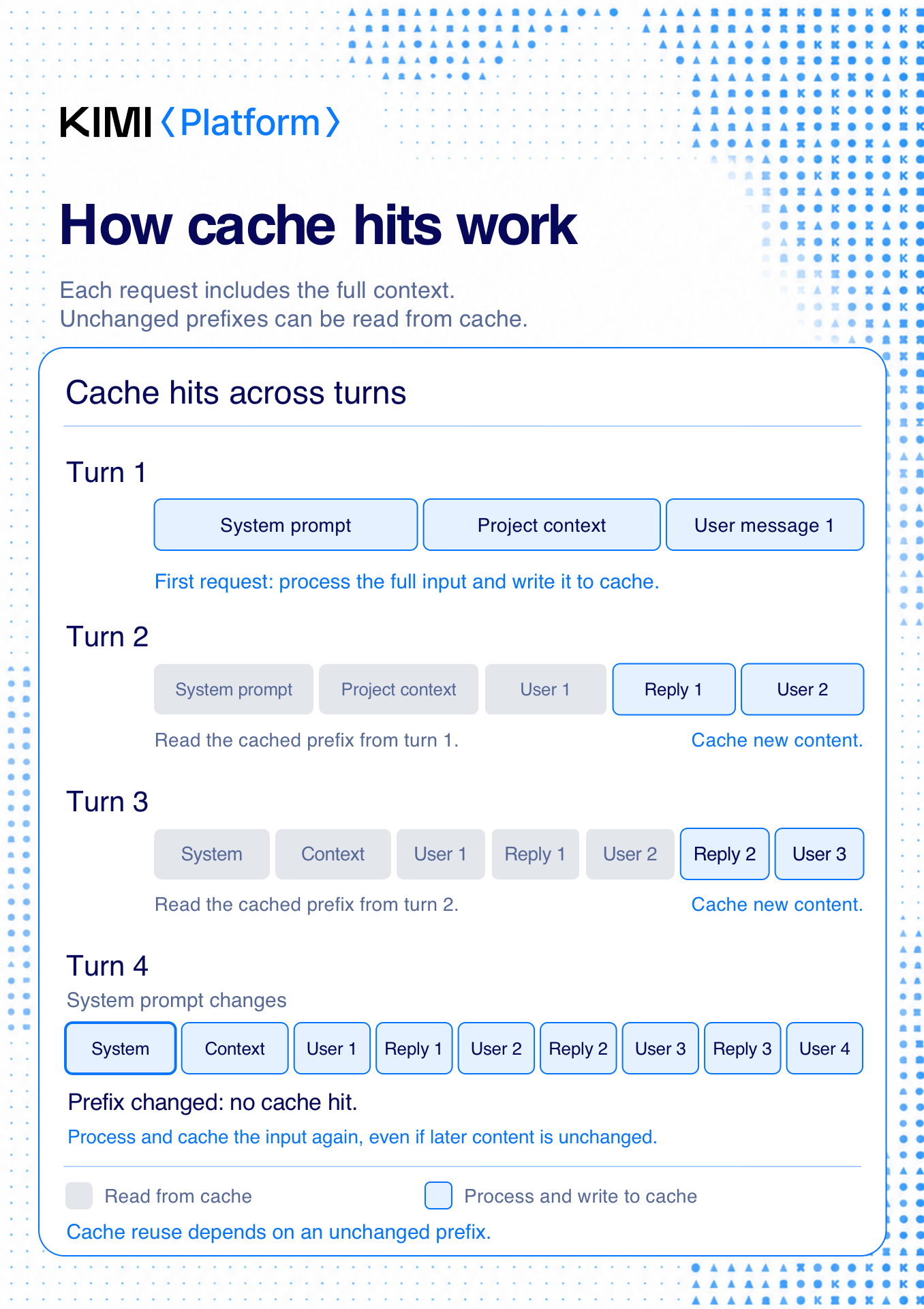
We recommend:
Put stable system prompts, tool definitions, reference material, and codebases at the front of the request.
Put content that changes on every turn, such as user questions, tool results, and task state, at the end.
Keep the order and exact text of fixed content unchanged within the same session. Do not put timestamps, random IDs, or other dynamic fields in the prefix.
Keep the interval of scheduled tasks within the TTL, so that each hit renews the entry and keeps it active.
Cache is isolated by organization (org): shared within an organization, not across organizations.
Caches cannot be cleared manually. A cached prefix expires automatically after it has been inactive for the selected TTL.
Pricing
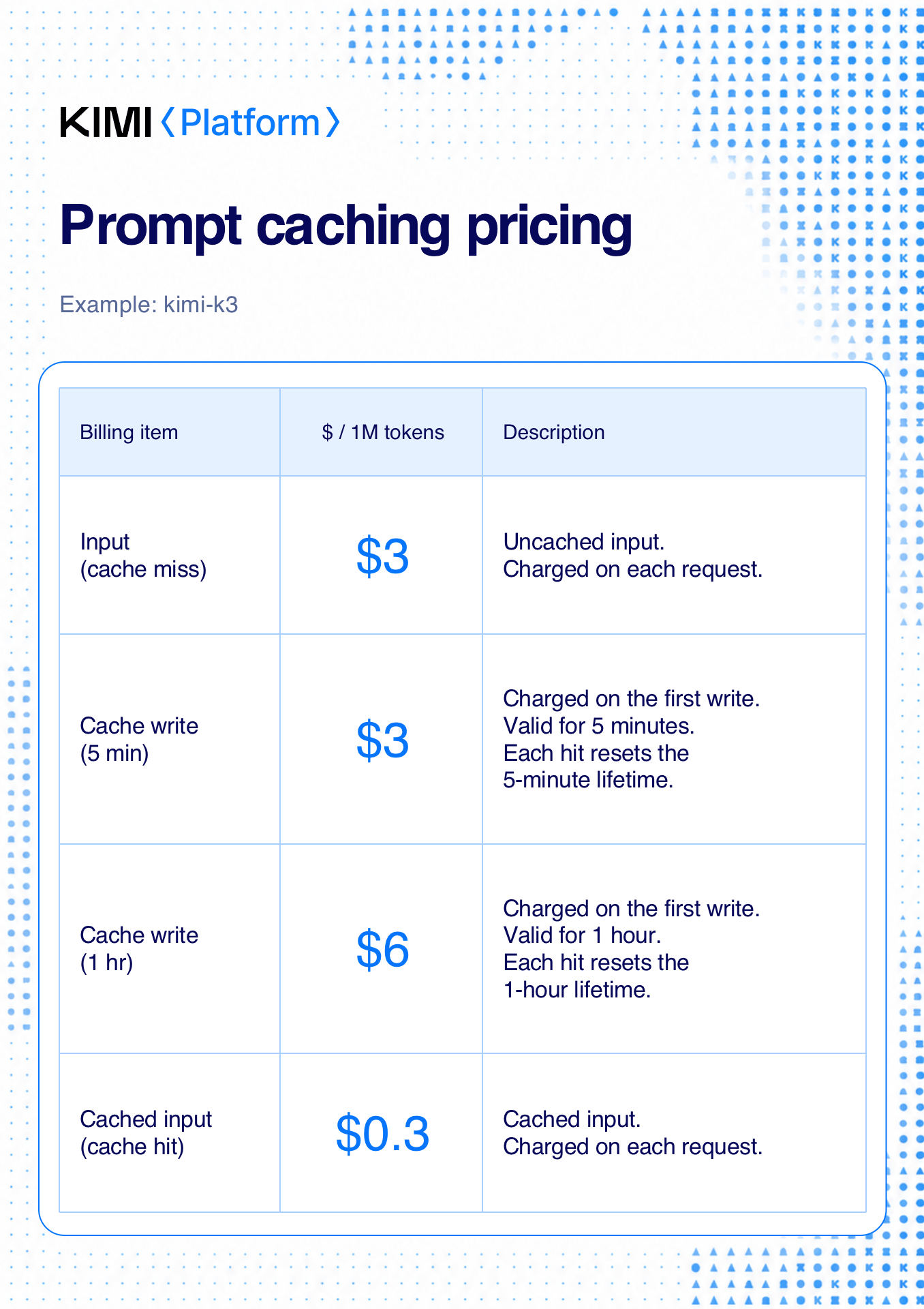
Cache Write is billed as a separate item. For kimi-k3, the cache-related prices are:
| Billing item | Price per 1M tokens | Description |
|---|---|---|
| Input (cache miss) | $3.00 | The portion of a request that misses the cache (billed per request) |
Cache Write (5m) | $3.00 | Charged once when the prefix is first written; valid for 5 minutes, and each hit resets the validity to 5 minutes |
Cache Write (1h) | $6.00 | Charged once when the prefix is first written; valid for 1 hour, and each hit resets the validity to 1 hour |
| Cached Input (cache hit) | $0.30 | The portion of a request served from cache (billed per request) |
For the complete prices of other models and billing items, see Model Inference Pricing.
Cache costs come down to two points:
Total cost stays the same: splitting out Cache Write makes billing transparent. The write cost was already included in the input price, so existing requests cost the same overall.
Every hit saves money: cached input costs one-tenth of uncached input. For
kimi-k3, the hit portion is billed as Cached Input (2.70 per 1M tokens on each hit.
Choose between 5m and 1h
Cache Write supports two TTLs: 5m and 1h. When prompt_cache_options is omitted, the system uses the 5m TTL by default: prefixes that meet the hit conditions are automatically written to the cache and reused, and Cache Write charges apply.
When follow-up requests usually arrive within 5 minutes, use
5m.When requests may arrive more than 5 minutes apart but the prefix will be reused within 1 hour, use
1h.When the same prefix is usually reused only after more than 1 hour, do not configure caching specifically for it.
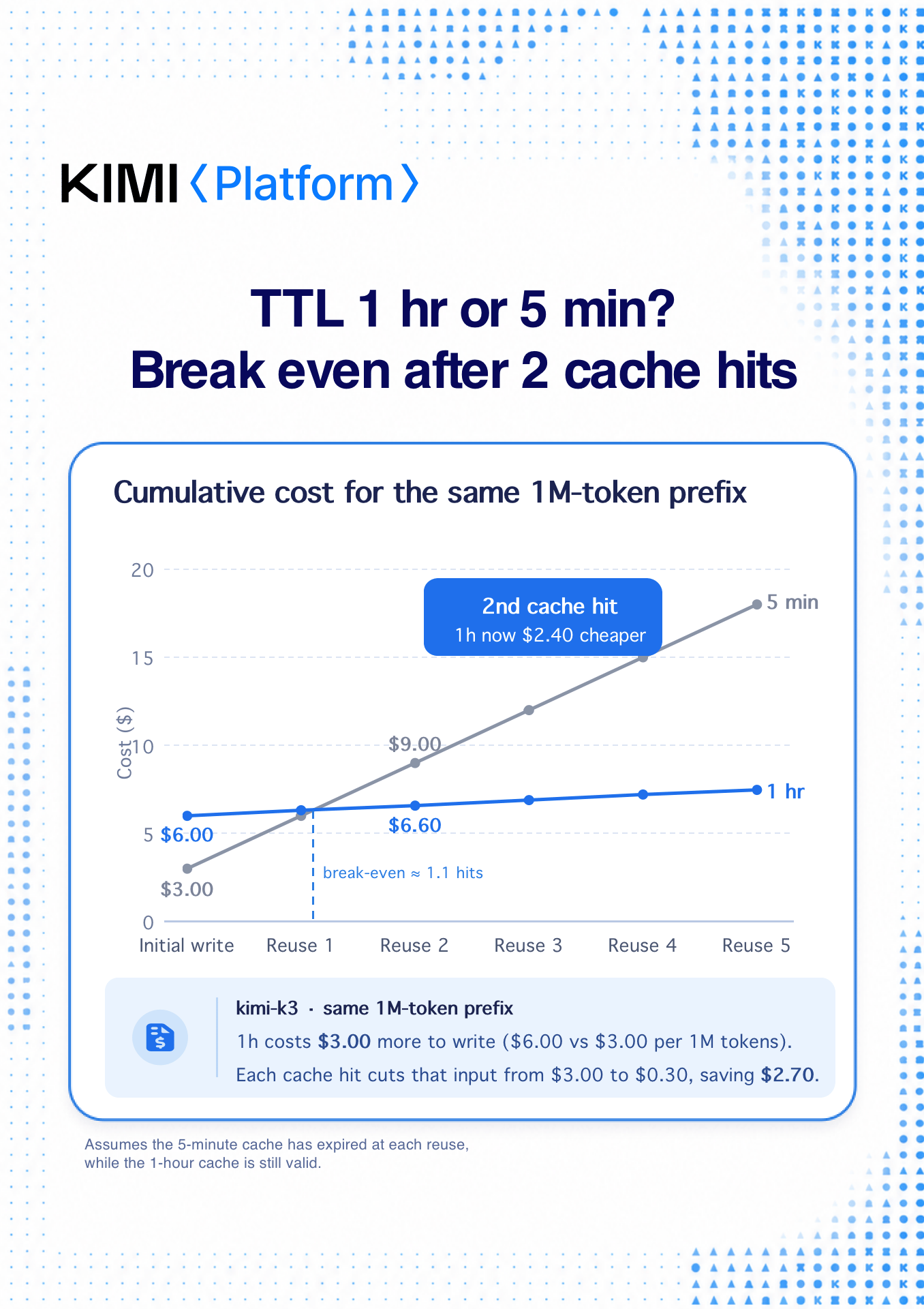
Here is the math for 1h (assuming a 1M-token prefix): with just two more hits within the hour, 1h costs less than 5m; the more hits, the more you save.
Choosing
1hover5m, the only extra cost is the write fee: 6.00 vs $3.00).Each cache hit then cuts that portion of input from 0.30, saving $2.70.
So: one hit saves 5.40, and after subtracting the extra 2.40.
A cache entry's TTL is locked at first write and cannot be changed later: when the same prefix hits, the entry is renewed for free under the original TTL, and any new portion continues to be written under the locked TTL. Only after the existing entry fully expires can the prefix be rewritten with a new TTL.
How to set the cache TTL
The Chat Completions API and Responses API write to the cache with a 5m TTL by default when prompt_cache_options is omitted. To specify a TTL, pass prompt_cache_options:
# Set prompt_cache_options.ttl to "5m" or "1h".
curl https://api.moonshot.ai/v1/chat/completions \
  --header "Content-Type: application/json" \
  --header "Authorization: Bearer $MOONSHOT_API_KEY" \
  --data '{
    "model": "kimi-k3",
    "messages": [
      {"role": "system", "content": "You are a product documentation assistant.\n\nProduct documentation: ..."},
      {"role": "user", "content": "Which authentication methods does this product support?"}
    ],
    "prompt_cache_options": {"mode": "implicit", "ttl": "1h"}
}'prompt_cache_options.mode currently supports only implicit, and ttl supports 5m and 1h. The Responses API uses the same parameter; see the Responses API reference.
The Anthropic Messages API uses the top-level cache_control field to control cache writes. When the field is provided, the request prefix is written to the cache with the specified TTL; when it is omitted, the request only reads the 5m cache and does not write to it:
# Set cache_control.ttl to "5m" or "1h".
curl https://api.moonshot.ai/anthropic/v1/messages \
  --header "Content-Type: application/json" \
  --header "Authorization: Bearer $MOONSHOT_API_KEY" \
  --data '{
    "model": "kimi-k3",
    "cache_control": {"type": "ephemeral", "ttl": "1h"},
    "max_tokens": 256,
    "messages": [{"role": "user", "content": "Hello"}]
}'cache_control is effective only at the top level; the same marker inside the messages body is ignored. See the Messages API reference for the full parameter contract.
Existing requests require no changes. After the Cache Write split, billing statements include a separate cache-write line item.
Check cache usage
Different APIs record cache reads and writes in different usage fields. If your application uses usage fields for cost tracking, migrate them as shown below:
| API | Total input | Cache read | Cache write |
|---|---|---|---|
| Chat Completions | usage.prompt_tokens | usage.prompt_tokens_details.cached_tokens | usage.prompt_tokens_details.cache_write_tokens |
| Responses | usage.input_tokens | usage.input_tokens_details.cached_tokens | usage.input_tokens_details.cache_write_tokens |
| Messages | usage.input_tokens + usage.cache_read_input_tokens + usage.cache_creation_input_tokens | usage.cache_read_input_tokens | usage.cache_creation_input_tokens |
For the Chat Completions and Responses APIs, cache reads, cache writes, and the uncached remainder are mutually exclusive and sum to total input tokens. For Messages, usage.input_tokens excludes cache reads and writes; usage.cache_creation.ephemeral_5m_input_tokens and usage.cache_creation.ephemeral_1h_input_tokens further break cache writes down by TTL.
For streaming Chat Completions API requests, set stream_options.include_usage=true for the complete cache read/write breakdown to appear in the usage field of the final chunk.
Billing and cache performance
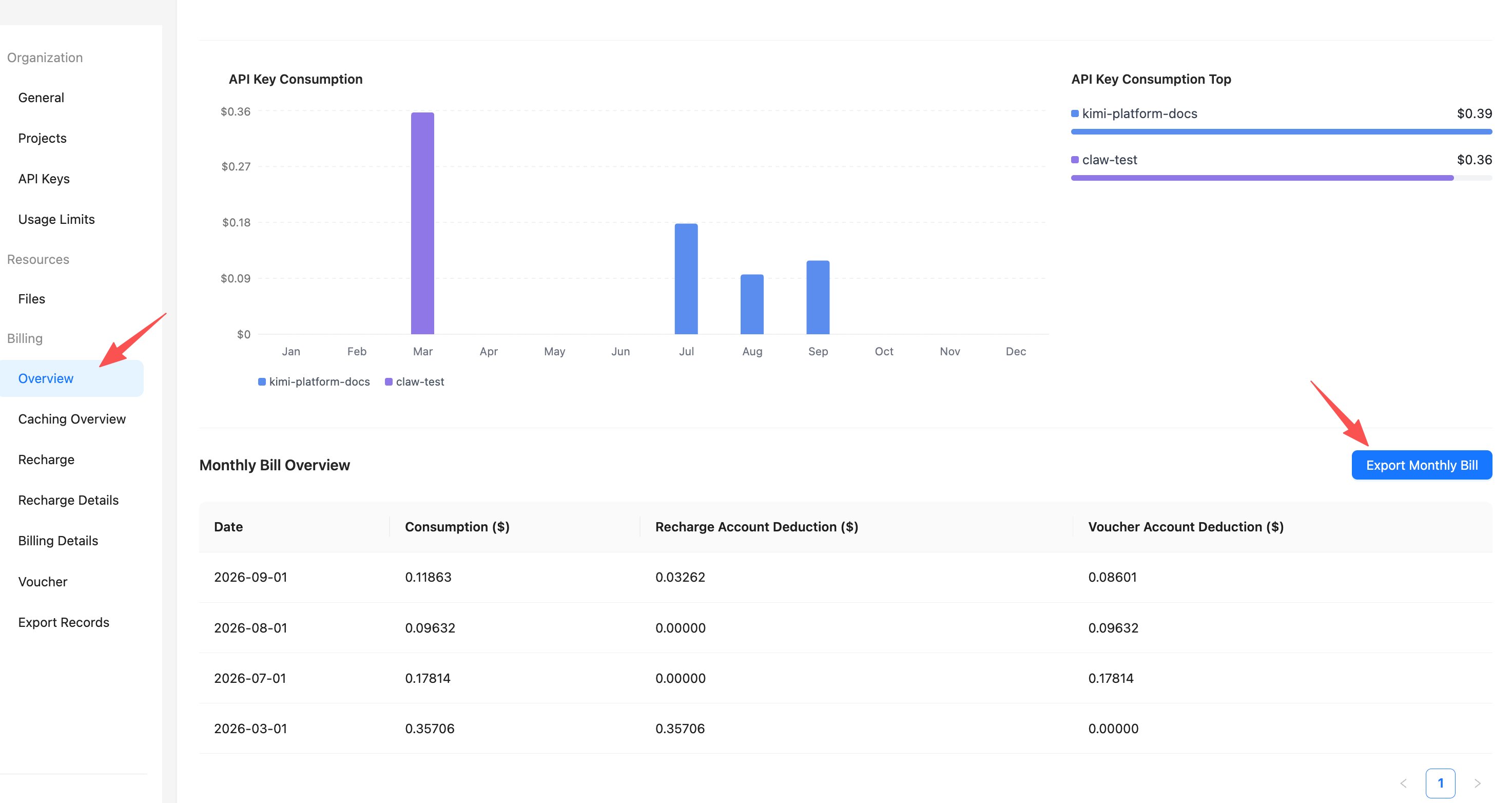
At the bottom of the Billing - Overview page, the Monthly Bill Overview section lets you export a monthly bill workbook, which now includes a cache-write detail sheet showing daily write fees for the
5mand1hoptions by project, organization, API key, and other dimensions:
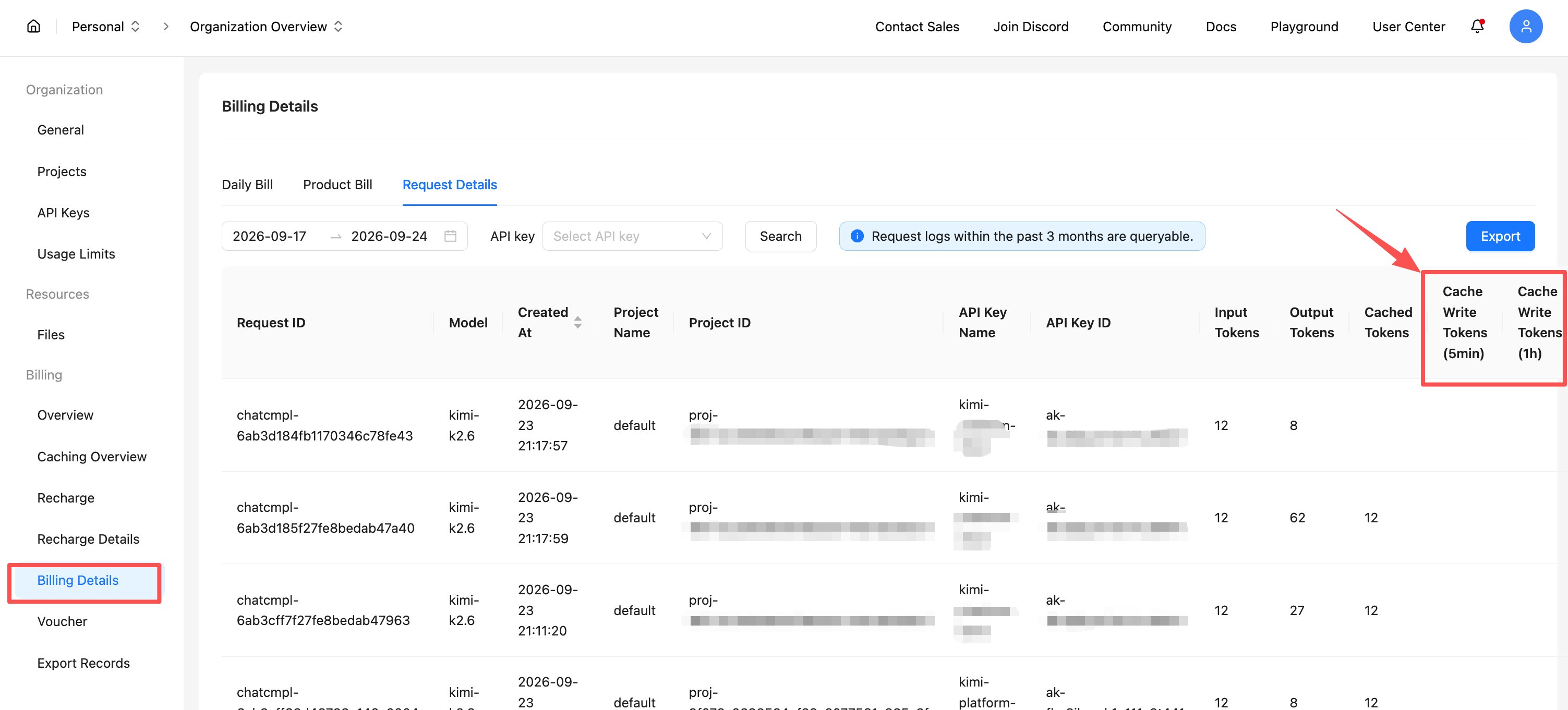
On the Billing - Billing Details page, the Request Details tab adds two columns, Cache Write Tokens (5min) and Cache Write Tokens (1h), for easier reconciliation. Input tokens = uncached tokens + cached tokens + cache write tokens:
With the Chat Completions API, for example, you can tell the TTL option of each write from the response headers:
Msh-Usage-Cache-Write-Tokens-5m: tokens written under the5moption in this request;Msh-Usage-Cache-Write-Tokens-1h: tokens written under the1hoption in this request.
When a request hits the cache entirely with no new writes, the corresponding value is 0.
The console now provides a Caching Overview page, where you can view the hit / miss / cache-write token breakdown per model over a selected time range, the cache hit rate, and the cache-write amortization multiple (cached tokens ÷ cache write tokens; the larger the number, the more the cache saves).
Related documentation
FAQ
kimi-k3 supports Cache Write; kimi-k2.7, kimi-k2.7-highspeed, and kimi-k2.6 do not.- The hit portion is not charged Cache Write fees again; it is billed only at the Cached Input rate (about 1/10 of the cache-miss rate for
kimi-k3); - A hit within the validity period automatically renews the cache under the original TTL, at no extra cost.
1h cache entry and pays one write fee; if a request 30 minutes later hits the cache, the entry is renewed for another hour from that point, and subsequent requests are billed only at the cache-hit rate.- If your requests arrive at a steady interval of under 5 minutes (such as continuously running agent tasks), the default
5moption is enough: hits renew the cache for free, so1his unnecessary; - If the interval may exceed 5 minutes (long sessions or tasks with human intervention), choose the
1hoption to avoid rewriting the cache after it expires, which significantly reduces cost and shortens time to first token (TTFT).
1h write cover the extra write fee, and every additional hit saves more (see the cost breakdown in "Choose between 5m and 1h").5m and 1h are two caches that do not share entries. Cache is isolated per organization: shared within an organization, not across organizations. Manual deletion is not supported; entries expire automatically after inactivity exceeding the selected TTL (for example, a 5m entry expires after at least 5 minutes of inactivity).