Today, we're introducing Kimi's solution for game development and creative work.
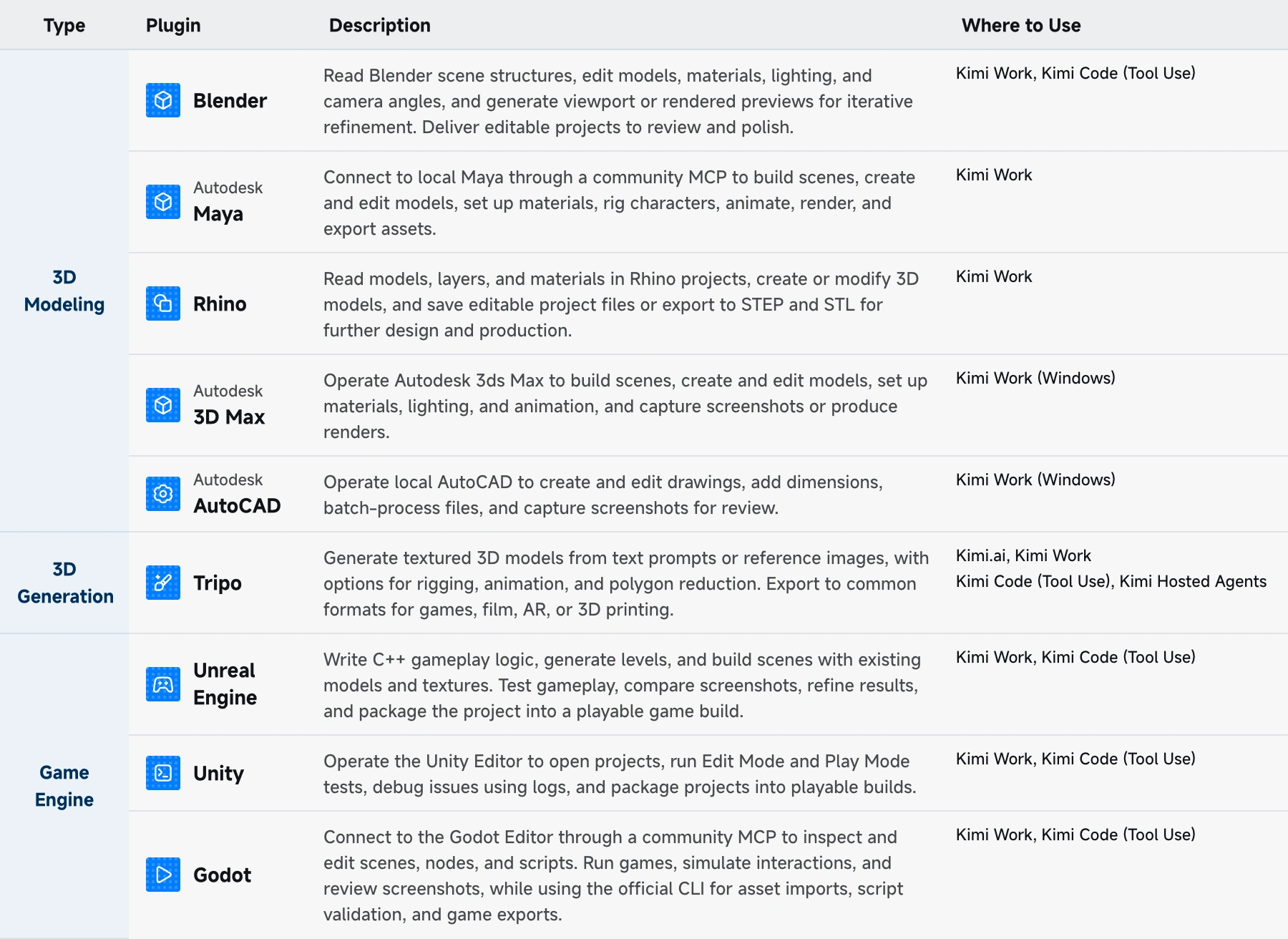
Building on the Kimi K3.1 model series, Kimi Code and Kimi Work agents, and plugins for professional tools such as Unity, Unreal Engine, and Blender, this solution aims to help game teams prototype and validate gameplay ideas more efficiently, streamline engineering and art workflows, and turn player feedback into faster, more focused iterations.
The real test of a game idea is how it feels to play. A design document can define the concept and mechanics, but it can't reveal whether the controls feel intuitive, the rewards are clear, or the pacing keeps players engaged. The later these issues are found, the more time and money teams take to fix them.
With Kimi, teams can move from idea to a playable prototype faster, learn what works through internal playtesting, and apply those insights to guide production.
The Challenge: The Trade-off Between Speed and Reliability
The first challenge is the cost of testing gameplay ideas.
The only way to know whether a gameplay idea is fun is to play it. But building prototypes takes time and resources, so teams often have to prioritize just a few ideas. How can teams test and compare more ideas without increasing the cost of each experiment?
That need is reflected in Unity's 2026 Game Development Report: 52% of surveyed developers prioritize smaller projects to reduce risk, and 67% keep prototyping to three months or less. With tighter timelines and more cautious development spending, efficient prototyping matters more than ever.
Kimi can help teams build playable prototypes faster, explore more gameplay ideas within limited time, and make better-informed decisions.
The second challenge lies in working across different teams and tools. Developers need clear tasks they can implement, and artists need assets that meet the game engine's requirements. When an AI assistant produces only text descriptions or images, the team still has a lot of work to do before using the output in production.
Kimi fits into existing workflows, works with the projects and editors teams already use, delivering editable files and clear action logs to support team review and collaboration.
Game Building with Kimi: From Creative Concept to Launch and Beyond
Kimi can help teams turn gameplay ideas into prototypes they can test.
For example, a game designer might want to test a new gameplay idea: adding mix-and-match rule cards to a match-3 game. A design document can explain the mechanics, but it's hard to tell how combining different rules might change the strategy or make the game more engaging.
Kimi can work out how different card combinations affect matching strategies, scoring, and player feedback, then break the work down into interaction design, gameplay balancing, UI, audio, and visuals to build a playable prototype.
This gives designers, engineers, and artists a shared reference to discuss, align on ideas, and reduce misunderstandings between teams.
The same approach can extend to other parts of game production and LiveOps, supported by Kimi's models and professional tools.
What Kimi offers: Models, agents, and plugins
Game teams work with design documents, screenshots, code, 3D assets, and many other project files.
Kimi's models can understand these inputs, plan tasks, and carry them out. Kimi Code helps teams write and modify code in their existing codebase, while Kimi Work can handle production tasks across multiple files and steps. Teams can keep editing the resulting files and use them in later stages of production.
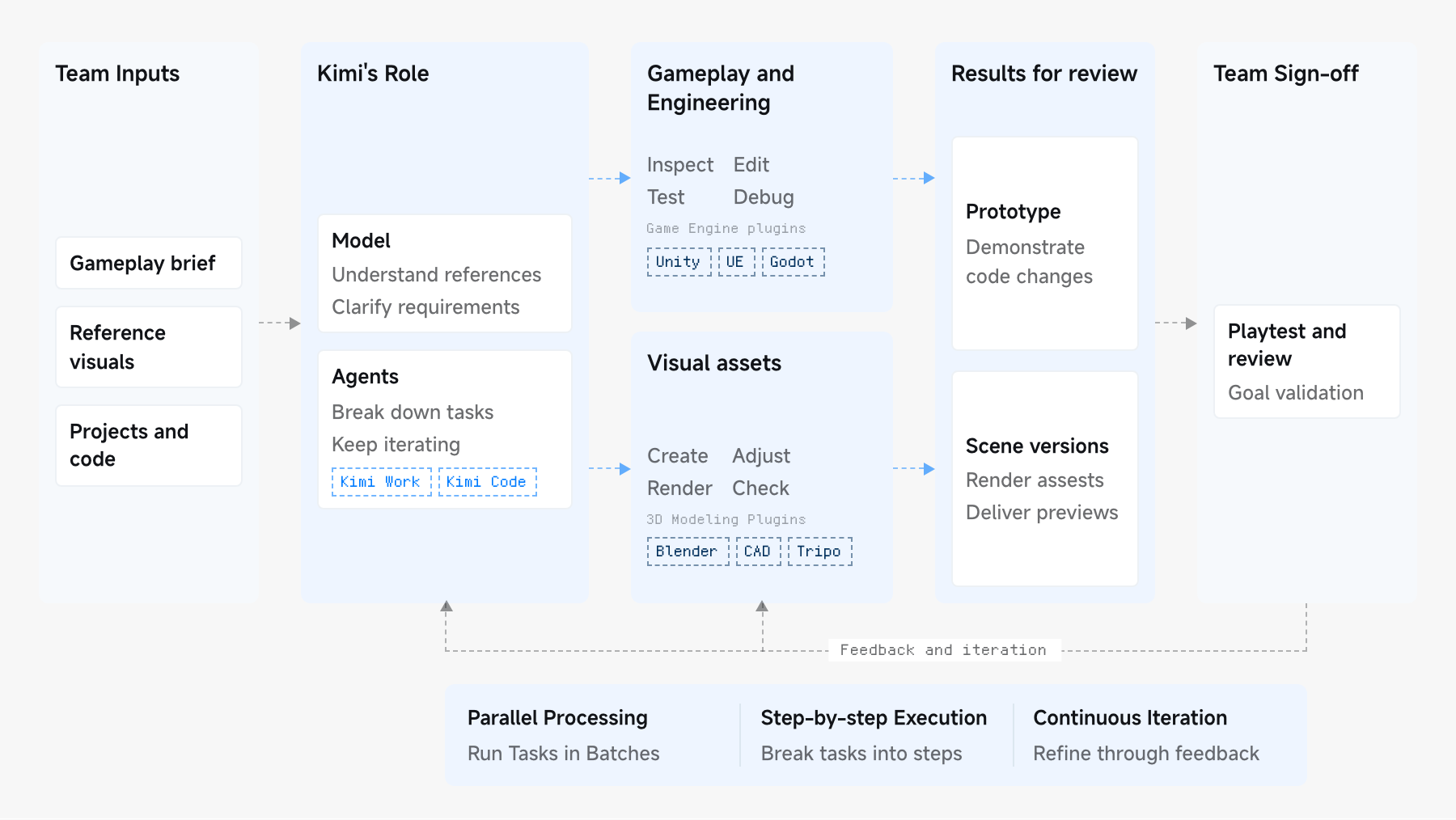
We offer a range of products for different teams, covering everyday work, coding, and API integration.
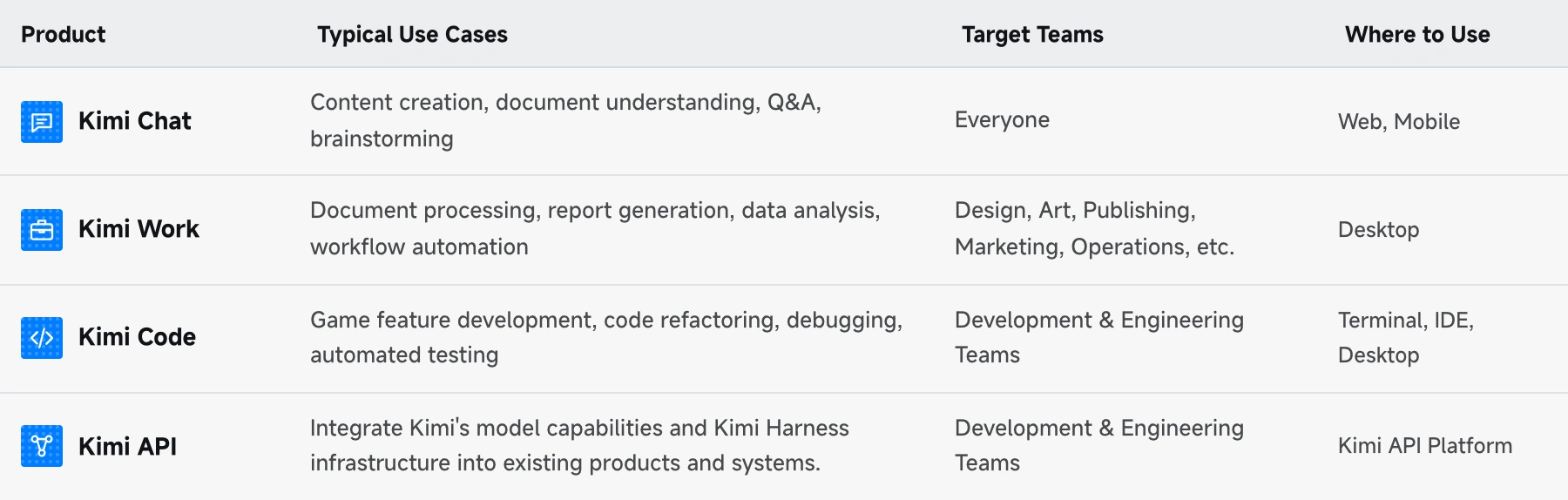
Beyond that, Kimi can connect to tools like Blender, Unity, and Unreal Engine through plugins and tool calls, helping teams with game development and 3D creation directly within their existing workflows.
Before the greenlight: Prototype core gameplay in Godot
Teams need to test gameplay ideas quickly, but development resources are often limited. Kimi can help designers and creative teams with little programming experience build a playable prototype in one or two days, so they can try the gameplay before investing further.
For example, a game team can start prototyping a 2.5D action game with Kimi by sharing reference images, videos, and a description of what they have in mind. Kimi can identify the key visual elements in those references, then build a playable demo in Godot, recreating the lighting, puddles, and lanterns of a rainy night scene, along with core mechanics such as sword attacks, dodging, and blocking.
Kimi can run the prototype, review rendered images and gameplay recordings, and make and test fixes on its own. Iterating before delivery helps the first version better meet the team's requirements.
The team can playtest combat clarity in the rain, how sword strikes feel, and how dodging and blocking work. It can then refine and retest the core gameplay before deciding whether to add more levels and enemy types.
From modeling to game scenes: Prepare assets in Blender
Before art assets are added to a game, teams need to check for visual issues such as inconsistent character designs, clipping, and texture defects, while ensuring assets meet engine requirements and performance budgets.
Using multimodal understanding, Kimi can analyze videos and screenshots from different angles to identify visual issues, then generate scripts and use a local agent to make initial fixes in professional software.
With the Blender plugin, Kimi can also help art teams build and edit scenes directly in Blender, whether working with existing assets or creating new models from references and requirements.
For example, when building an architectural scene, Kimi can establish the overall shape and layout, then develop the structure, materials, and lighting. Complex buildings can be broken into smaller components and built in stages, with previews and adjustments along the way. This gives artists a more complete first version to refine, allowing them to focus on creative decisions and details rather than basic setup and repetitive troubleshooting.
Production workflows: Bring agents into Unity and Unreal Engine projects
Once a game enters production, teams need to work within existing projects and architectures while adapting to changing requirements. Even a small feature can affect character states, UI, save data, and level logic, while complex 3D scenes introduce additional challenges in visuals, physics, and performance.
With access to project files and the necessary permissions, Kimi can inspect code, scene hierarchies, and dependencies to identify what needs to change, then use plugins to make edits directly in game engines like Unity and Unreal Engine.
To verify the changes, Kimi can reproduce issues, check logs and runtime data, and iterate on fixes. It can also provide code diffs and test records for engineers to review functionality, performance, and compatibility.
We've explored several applications of this workflow internally:
Kimi + Unity: From a web demo to a project developers can build on. A playable demo is just the beginning. Bringing a game to launch requires further work on the project to support ongoing debugging, refinement, and iteration. Working with Unity China's game development agent Tuanjie Codely Agent and Tuanjie Engine, Kimi connects requirements understanding, project implementation, and iterative testing. Kimi's model interprets the developer's creative intent and game design, generates implementation code, and analyzes recordings and test results to identify issues and plan fixes. Through its native integration with Tuanjie Engine, Tuanjie Codely Agent operates directly within the engine using Editor / Runtime Scripts and other tools to build scenes, implement gameplay, modify the project, and run tests.
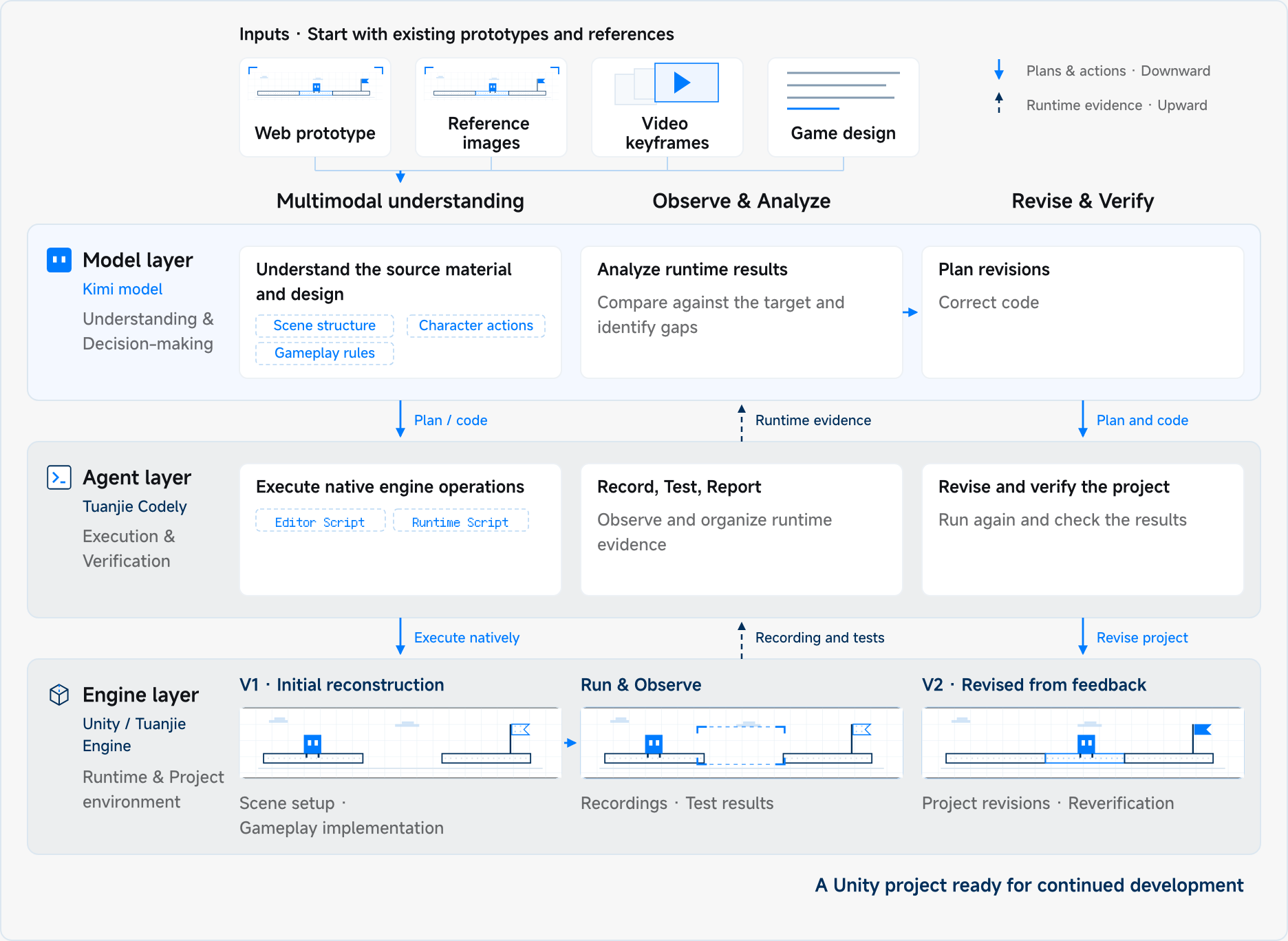
This shifts the workflow from "the developer specifies requirements → the model writes code → the developer performs the operations" to a continuous cycle: "the model interprets and generates → the Agent operates the engine → the model analyzes feedback → the Agent modifies the project and tests again," reducing the need for developers to switch between tools and perform manual operations.
In one demo, Kimi worked autonomously for 20 hours without human intervention, recreating the original game and delivering a native engine project that developers can build on to expand gameplay, polish visuals, and adapt across platforms.
Kimi + Unreal Engine: Implementing and testing gameplay changes across modules. Even a small change to a gameplay mechanic can affect character behavior, animation, physics, and UI. With the relevant scripts, component settings, and requirements, Kimi can trace dependencies, update code, add logs and tests, and verify the results in Unreal Engine. For example, a finishing move in a wuxia action game may involve drawing a sword, striking an enemy, sheathing the weapon, and triggering a story event. Kimi can help connect animations, physics, combat, and story logic, fixing issues like misaligned animations, unnatural falls, or missed triggers. Developers can then focus on polishing combat timing, hit feel, and storytelling.
Kimi + Unreal Engine: Assisting with complex 3D scene creation. Creating large 3D scenes involves combining architecture, terrain, vegetation, and other elements while balancing composition, lighting, and physics. Imagine a wuxia RPG scene with a sea of clouds, floating islands, an ancient city, and a colossal Buddha statue. Each element needs to fit together in scale, placement, and depth. With access to the local project and permission to run commands, Kimi can use Unreal Engine's tools to place key assets, adjust their scale, and establish the overall layout based on developer instructions. It can then provide screenshots from different angles for review, giving developers a starting point for further refinement.
From launch to live operations: Let player feedback guide the next iteration
A game doesn't stop evolving when it launches. Neither does the work behind it.
Publishing teams test which gameplay hooks appeal to their target players, LiveOps teams track issues raised in community discussions and support tickets, and content teams handle localization, user-generated content (UGC), and moderation. Doing all this manually makes it harder to respond quickly.
Kimi helps teams streamline these workflows, from testing marketing ideas and drafting promotional content to summarizing community feedback with source links and flagging potential risks in UGC. Teams can also arrange scheduled tasks to run in batches, reducing manual work and freeing up time for creative decisions.
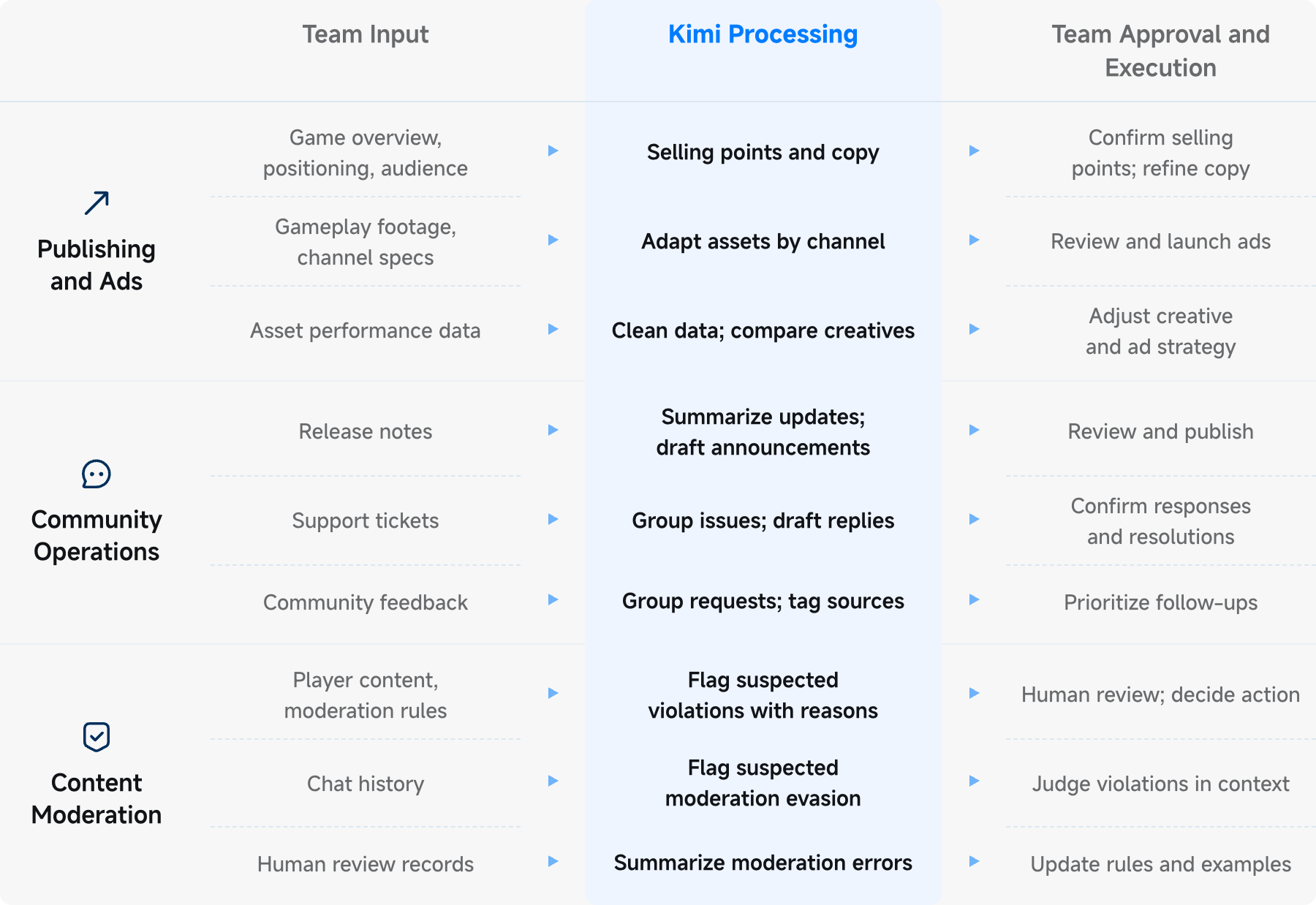
Here's how Kimi can help teams attract and retain players:
Prototyping gameplay for user acquisition. To test a promising mechanic, teams first need a playable prototype. Given a reference video, Kimi can recreate the core gameplay, write code, build assets in Blender, and assemble scenes in Godot or other engines. It can then refine gameplay parameters, animations, and visual effects to better match the intended experience. Teams can reuse this workflow to test more ideas with less time and effort.
Producing and testing ad creatives. Starting with a creative reference, Kimi can record gameplay directly in the game engine and use open-source editing and motion graphics tools to create variations in hooks, pacing, and messaging. It can also generate music, subtitles, and ad copy, adapting each version for different platforms and languages. With access to campaign data, Kimi can compare performance across versions and help teams refine their next round of creatives.
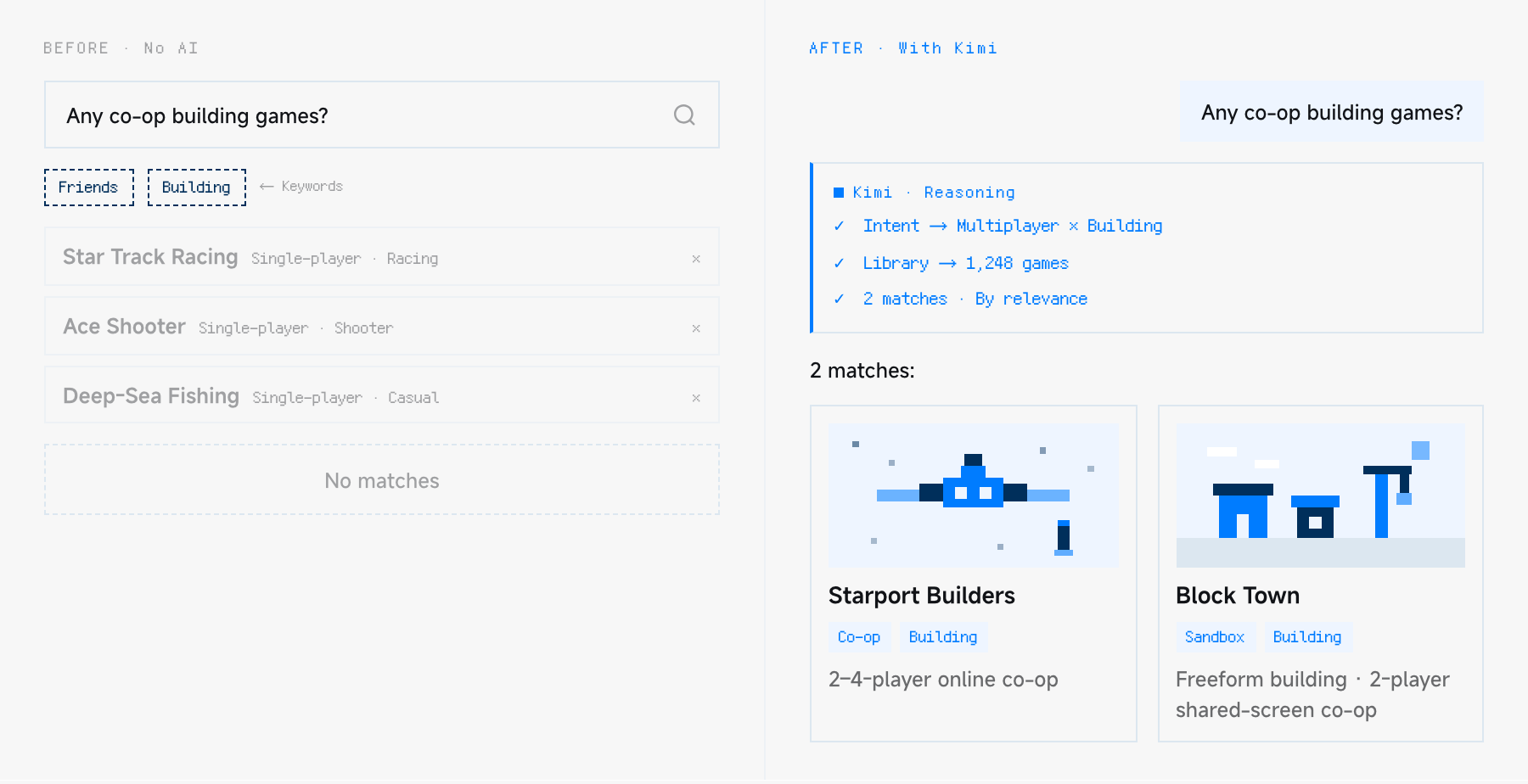
Personalized in-game assistants. Integrated into games or platforms through the API, Kimi can use game knowledge and conversational context to personalize recommendations, answer questions, and provide gameplay guidance. For example, when a player asks for “a building game to play with friends,” Kimi can search the catalog and suggest games with explanations of why they fit. Within a game, it can also use the game world and current gameplay context to support NPC dialogue, team composition suggestions, and post-match analysis.
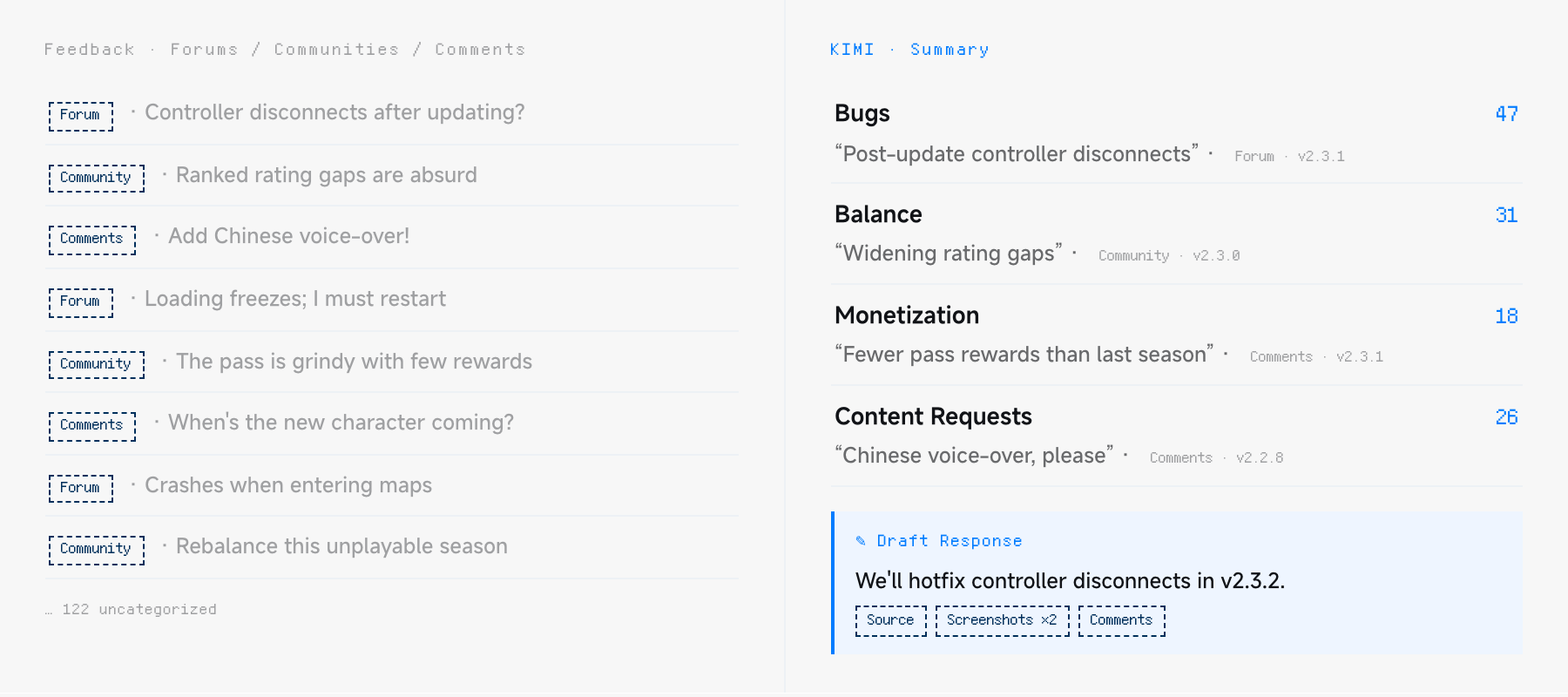
Analyzing community and player feedback. Reviewing feedback across forums, community channels, and comments can be time-consuming. Kimi can categorize bug reports, balance issues, monetization concerns, and content requests, while preserving source links, game versions, and feedback channels. For complex disputes, it can cross-check posts, screenshots, and comments, then draft responses backed by original sources. LiveOps and development teams can use these insights to prioritize fixes, plan updates, and respond to players faster.
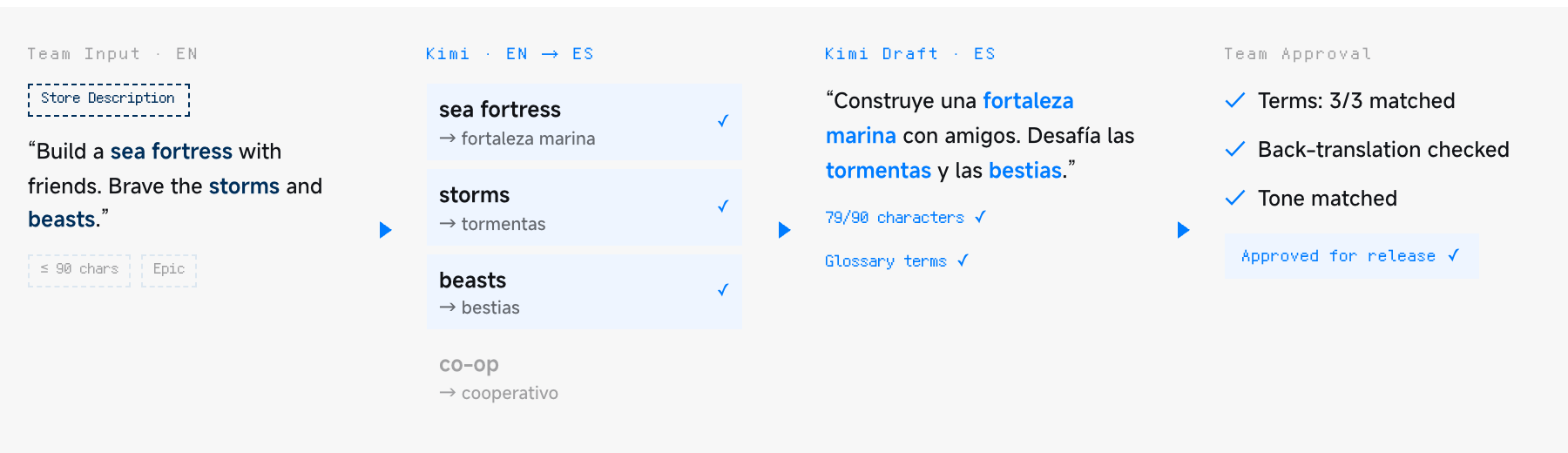
Streamlining game localization and review. Game localization goes beyond translation, requiring consistent terminology, character voices, and language that feels natural to local players. Using glossaries, character guidelines, and length limits, Kimi can draft translations and flag culture-specific references for human review. After review, it can back-translate selected passages to help identify meaning shifts or omissions.
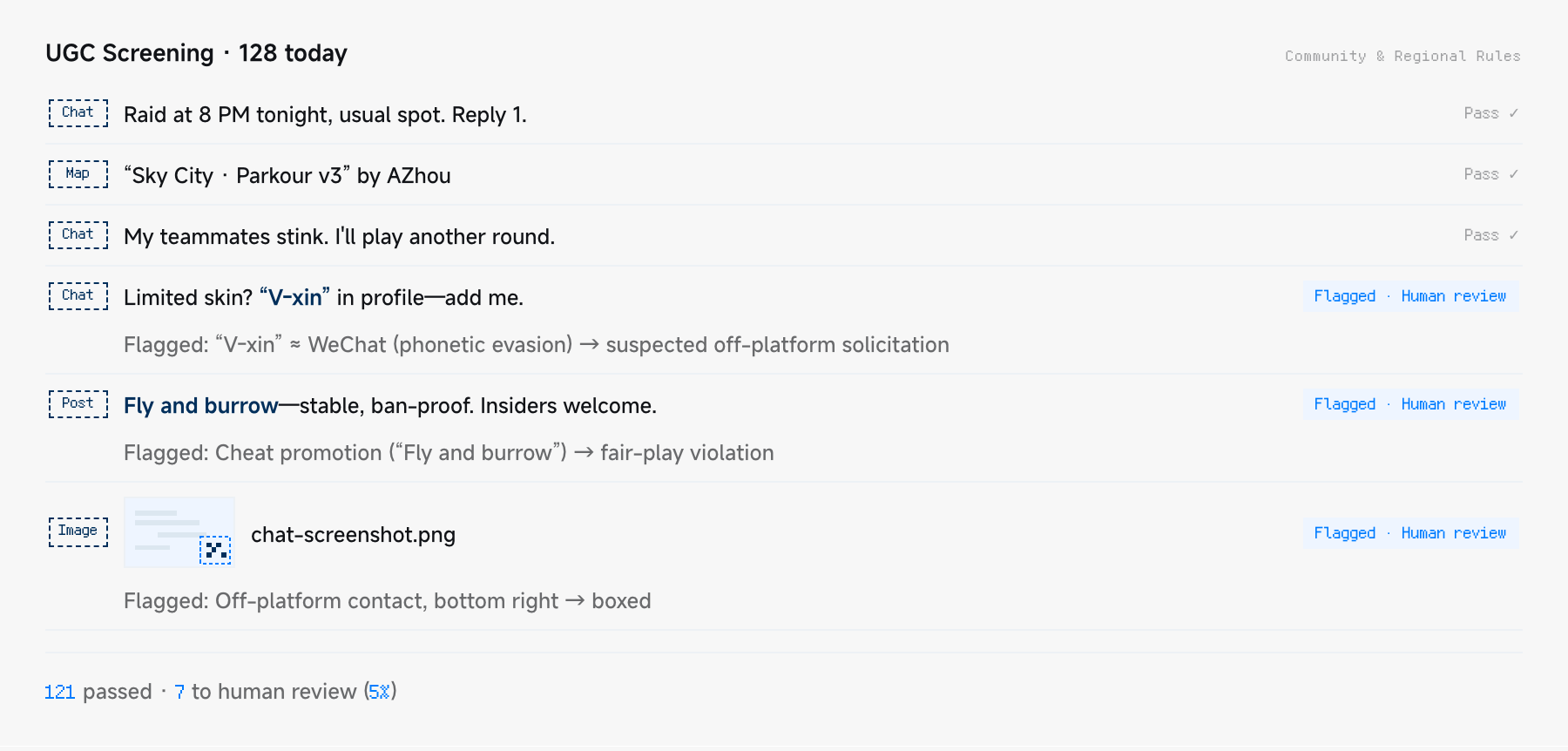
Identifying risks in player-generated content. From custom maps and images to chat messages, player-generated content needs to comply with platform rules and regional requirements. Kimi can help screen for potential violations, including disguised language using homophones or abbreviations. It can flag suspicious content, pinpoint where issues appear, and explain why they may violate the rules, helping moderators focus on complex cases and improving moderation policies.
Start with a Measurable Task
A good starting point could be a small, well-defined task, such as prototyping a gameplay mechanic, updating a feature, reviewing game screenshots, or analyzing community feedback.

Depending on the task, teams can use Kimi Work or Kimi Code with the relevant plugins. With the necessary materials and permissions in place, Kimi can carry out the work, with human approval where needed. Teams can then review the results against their requirements.
A small pilot can help assess both speed and quality, including time spent, results, and the need for further review. Workflows that prove useful can be documented and gradually applied to other projects.
For enterprise plans, custom Skills, or dedicated data integrations, feel free to contact the Kimi team to explore what might work for your team.