Pricing details
Kimi offers four membership tiers, each available as a monthly or annual subscription. Annual billing saves you up to $480/year.
Plans at a glance
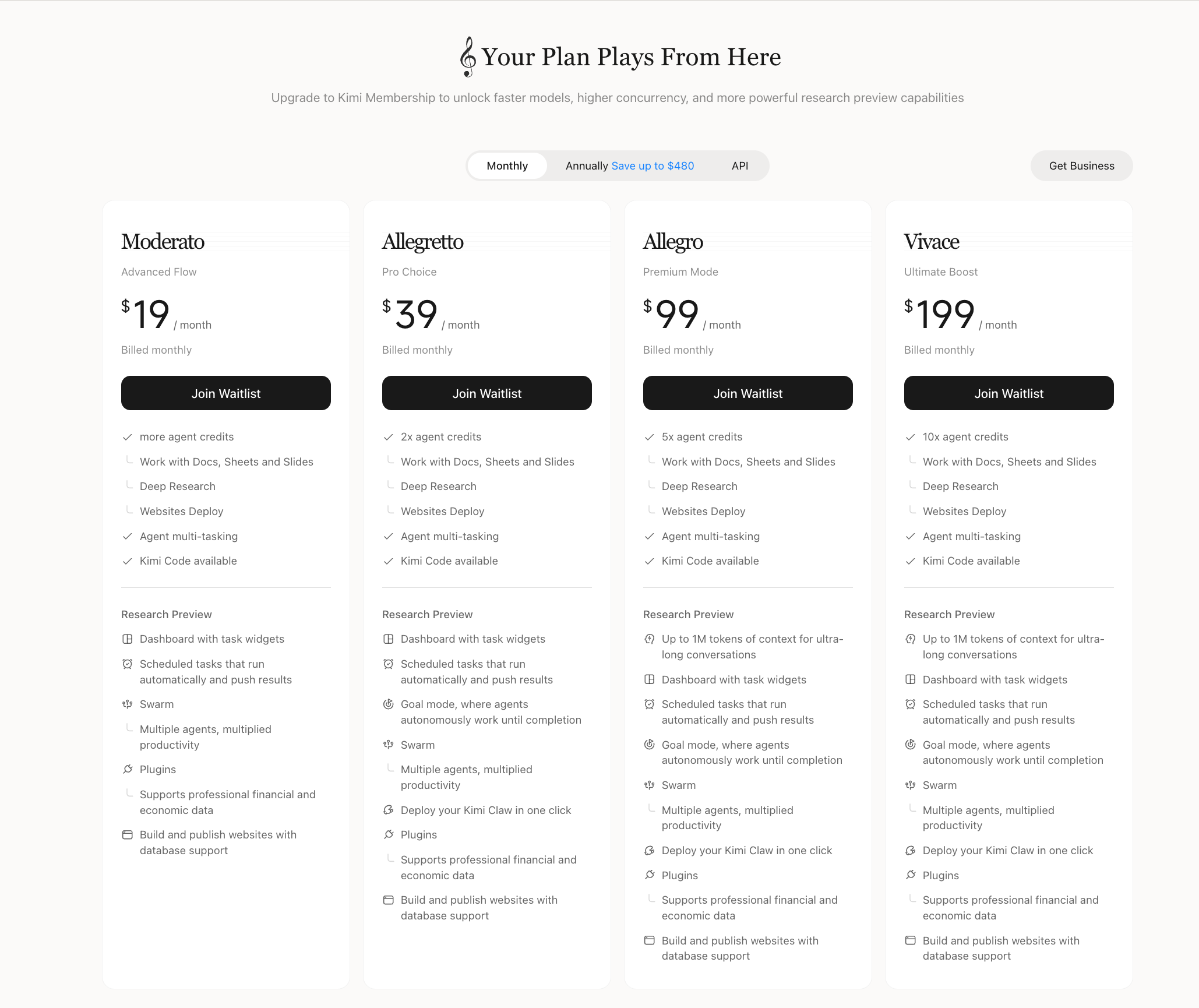
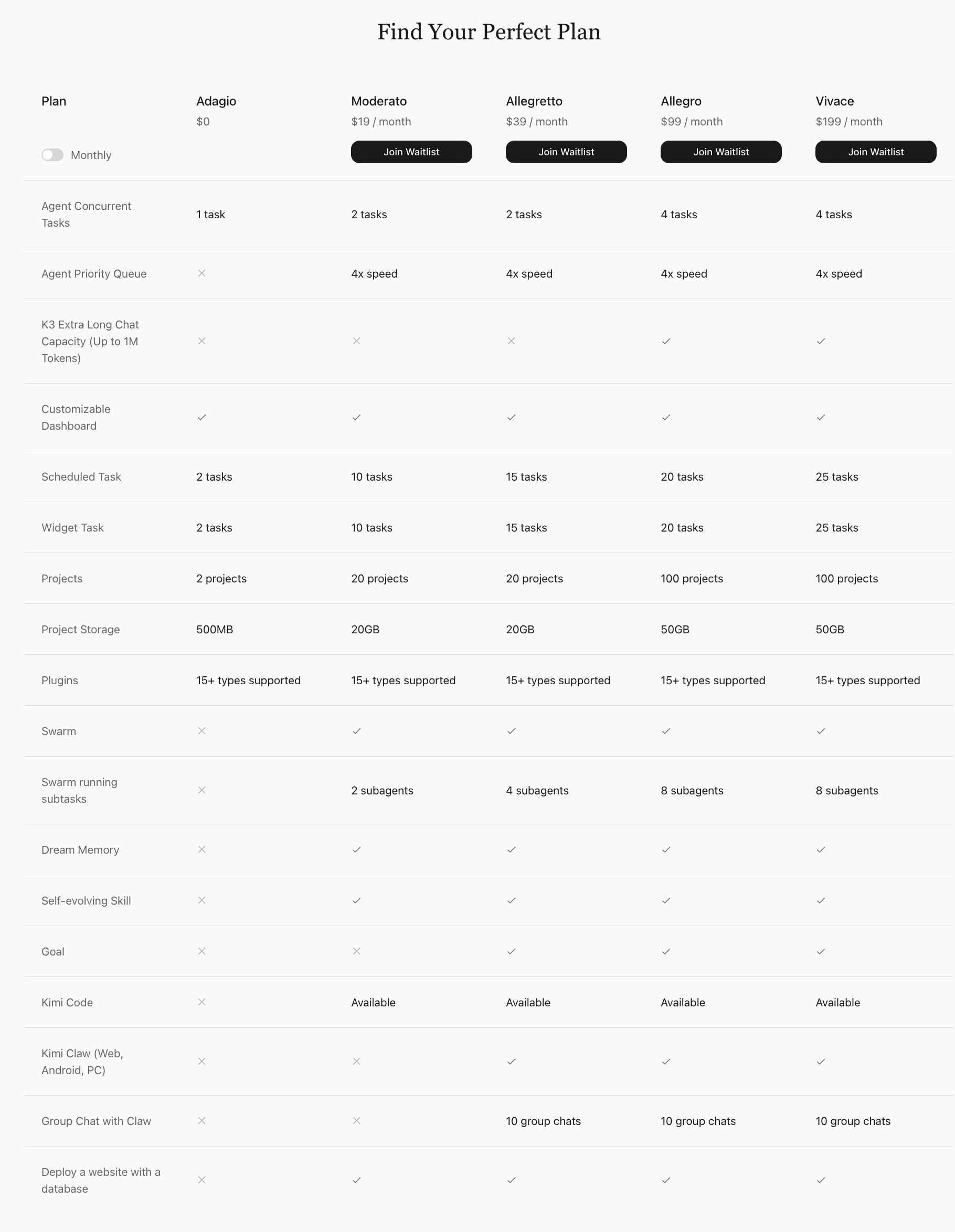
| Feature | Moderato ($19/mo) | Allegretto ($39/mo) | Allegro ($99/mo) | Vivace ($199/mo) |
|---|---|---|---|---|
| Agent credits* | 60 | 150 | 360 | 720 |
| Agent concurrent tasks | 2 tasks | 2 tasks | 4 tasks | 4 tasks |
| Agent priority queue | 4× speed | 4× speed | 4× speed | 4× speed |
| K3 extra-long chat capacity (up to 1M tokens) | — | — | ✅ | ✅ |
| Customizable dashboard | ✅ | ✅ | ✅ | ✅ |
| Scheduled tasks | 10 tasks | 15 tasks | 20 tasks | 25 tasks |
| Widget tasks | 10 tasks | 15 tasks | 20 tasks | 25 tasks |
| Projects | 20 projects | 20 projects | 100 projects | 100 projects |
| Project storage | 20GB | 20GB | 50GB | 50GB |
| Plugins | 15+ types supported | 15+ types supported | 15+ types supported | 15+ types supported |
| Agent Swarm | ✅ | ✅ | ✅ | ✅ |
| Agent Swarm concurrent subtasks | 2 subagents | 4 subagents | 8 subagents | 8 subagents |
| Dream Memory | ✅ | ✅ | ✅ | ✅ |
| Self-evolving skills | ✅ | ✅ | ✅ | ✅ |
| Goal Mode | — | ✅ | ✅ | ✅ |
| Kimi Code | Available | Available | Available | Available |
| Kimi Claw (Web, Android, PC) | — | ✅ | ✅ | ✅ |
| Group chat with Claw | — | 10 group chats | 10 group chats | 10 group chats |
| Professional database | 2,000 calls | 5,000 calls | 12,000 calls | 24,000 calls |
| Deploy a website with a database | ✅ | ✅ | ✅ | ✅ |
* Approximate values based on typical task token consumption. Monthly credits are converted to the equivalent number of tasks for the same feature; for reference only.
Monthly vs. annual pricing
| Plan | Monthly | Annual (per month) | Annual Total | You Save |
|---|---|---|---|---|
| Moderato | $19/mo | $15/mo | $180/yr | $48/yr |
| Allegretto | $39/mo | $31/mo | $372/yr | $96/yr |
| Allegro | $99/mo | $79/mo | $948/yr | $240/yr |
| Vivace | $199/mo | $159/mo | $1,908/yr | $480/yr |
Credit allocation
All Kimi membership features share a single credit pool, metered by token usage. Kimi Code also has its own 5-hour / weekly rate limit that applies only to Kimi Code and does not affect other features. K2.6 conversations in Chat are also billed against credits. Higher tiers include a proportionally larger credit pool, supporting more frequent and complex workflows. See Credit Update & Usage Rules for details.
Credit FAQ
How do I check my credit usage?
- Web: Click your avatar in the lower-left corner → Settings → Subscription
- App: Me → Membership Plan → Subscription
You can view your current credit balance as a percentage, the next refresh time, and your most recent 1,000 usage records, including usage time, feature, and consumption percentage.
Usage details may have a brief delay. Please refer to the current credit display.
What if I use up my credits?
Tasks already in progress can be completed normally. New tasks will show an insufficient credit prompt. You can:
- Wait for credits to refresh automatically each month (Kimi Code's separate 5-hour/weekly usage limit also resets on its own and only affects Kimi Code)
- Upgrade to a higher-tier membership plan for more credits
- Purchase an Extra Usage pack: once enabled, you pay as you go and don't need to wait for credits to refresh
- Join official campaigns to receive bonus credits
Can I use all my credits on one feature?
Yes. All membership features share a single credit pool, and you can allocate it as you like. Keep in mind that if one feature uses up all the credits, it will affect the other features too. Kimi Code also has its own separate 5-hour/weekly rate limit that applies only to Kimi Code.
What is the “Claw-云主机” 0.6% charge deducted every day at 4 PM?
This is the sandbox running cost of your Kimi Claw cloud host. Kimi Claw is an OpenClaw deployment in the cloud: every time you invoke Claw, the system starts an isolated cloud sandbox to execute code, operate the browser, or call tools. Sandboxes are not “free standby”—they are billed continuously by runtime and resource consumption. Even when you are not actively running tasks, a deployed cloud host retains its runtime environment and data, so about 0.6% of your membership credits is deducted each day, settled at 4:00 PM.
If you do not plan to use Kimi Claw for a while, save important files such as memory, soul, and workspace files locally first, then delete the cloud host; no further charges apply after deletion, and you can redeploy anytime.
What is the “Agent Website - Cloud Service” 0.08% charge?
This is the cloud service fee for a website you published with Agent. A published website continuously occupies cloud resources to stay online and accessible, so about 0.08% of your membership credits is deducted. If you no longer need the website online, click “Unpublish” to stop the charges.
Was this article helpful?