A well-designed café website helps coffee shops showcase their menus, reflect their atmosphere, and attract more customers. However, choosing the right layout depends on your café's style, from cozy neighborhood coffee shops to modern specialty cafés. This guide explores 10 café website templates for different coffee shop types, along with design ideas to help you create an appealing online presence.
Overview of 10 café website templates
Each café has its own style, menu, and customer experience, so the right template depends on what your business offers. Use the table below to compare these 10 café website templates and find the one that best fits your needs.
| café website template | Key features | Essential sections | Main purpose | Suitable for |
|---|---|---|---|---|
| Specialty coffee shop | Brewing guides, signature drinks | Coffee menu, bean origins | Highlight coffee quality and expertise | Premium coffee and brewing experiences |
| Bakery café | Daily specials, custom orders | Bakery menu, product gallery | Showcase fresh products and treats | cafés serving coffee and baked goods |
| Brunch café | Table reservations, opening hours | Brunch menu, popular dishes | Attract diners and simplify bookings | Breakfast and brunch restaurants |
| Book café | Literary events, community updates | Book collection, reading areas | Promote a cozy reading atmosphere | cafés combining reading and coffee |
| Vegan café | Dietary labels, nutrition details | Vegan menu, ingredient lists | Highlight plant-based options | Plant-based cafés |
| Cat café | Booking options, visitor guidelines | Cat profiles, visiting information | Explain the experience and manage visits | cafés offering cat interactions |
| Coffee roastery | Brewing tips, wholesale inquiries | Bean catalog, roast profiles | Promote roasted coffee and online sales | Coffee roasting and bean sales |
| Dessert café | Bestsellers, custom orders | Dessert menu, product gallery | Showcase desserts and encourage purchases | cafés specializing in sweets |
| Garden and outdoor café | Event information, location map | Outdoor gallery, seating details | Highlight the outdoor dining experience | cafés with garden or patio seating |
| Mobile coffee shop | Location updates, event schedules, pre-orders | Drink menu, service locations | Help customers find and order from the coffee shop | Coffee trucks, carts, and pop-ups |
Explore 10 popular café website templates
Choosing the right café website template depends on your coffee shop's style, menu, and business goals. Some designs focus on online ordering and menu presentation, while others highlight the café's atmosphere, story, or signature drinks. Explore these 10 examples to find a layout that suits your café's needs.
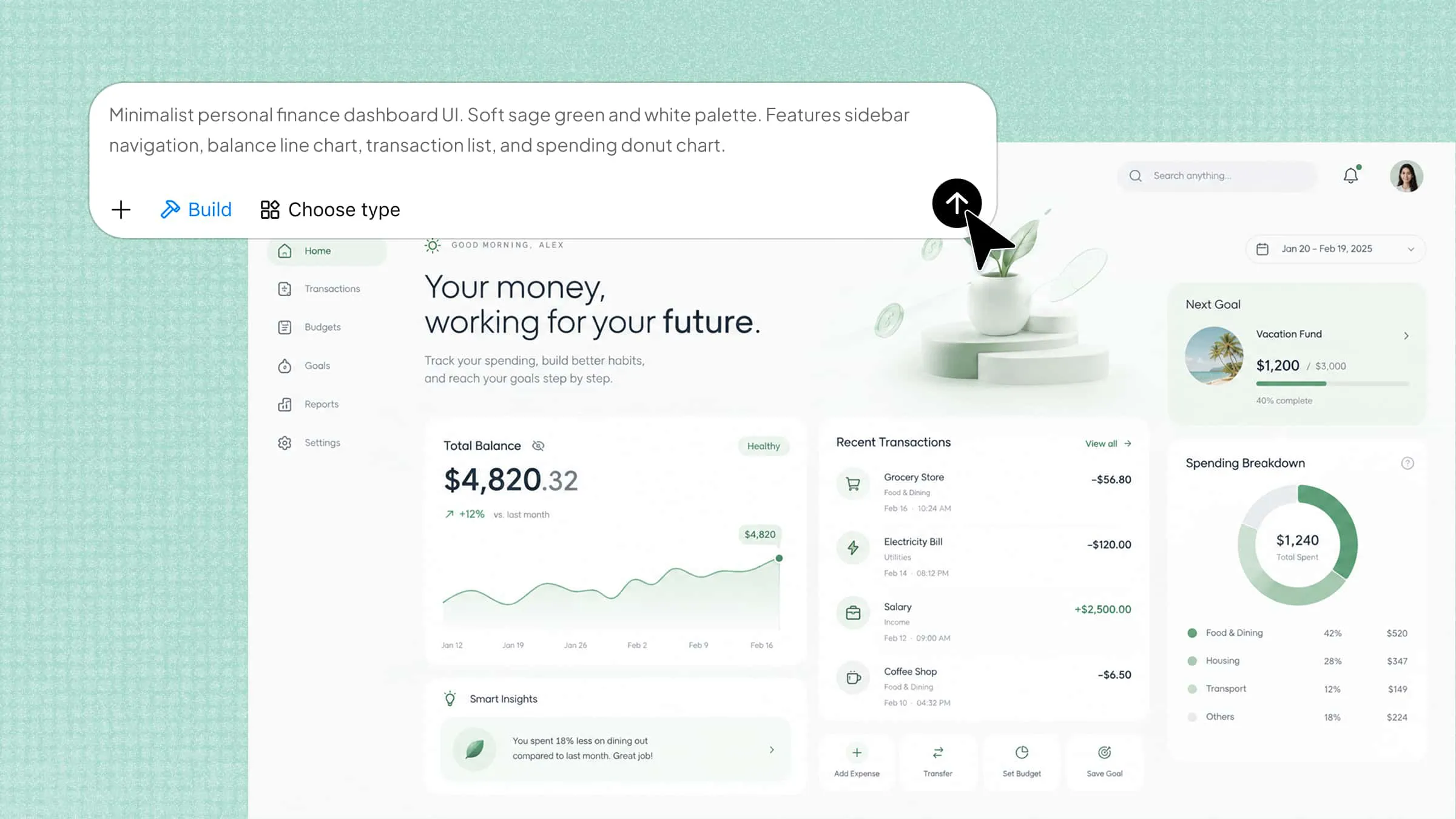
Kimi Build, an AI website builder, can help you create a café website template by turning your ideas into a tailored design. Describe your café's atmosphere, menu, colors, and essential pages in a prompt. The AI generates a website layout that you can review and refine. Adjust the menu sections, images, and other details to suit your brand before publishing.
Specialty coffee shop template
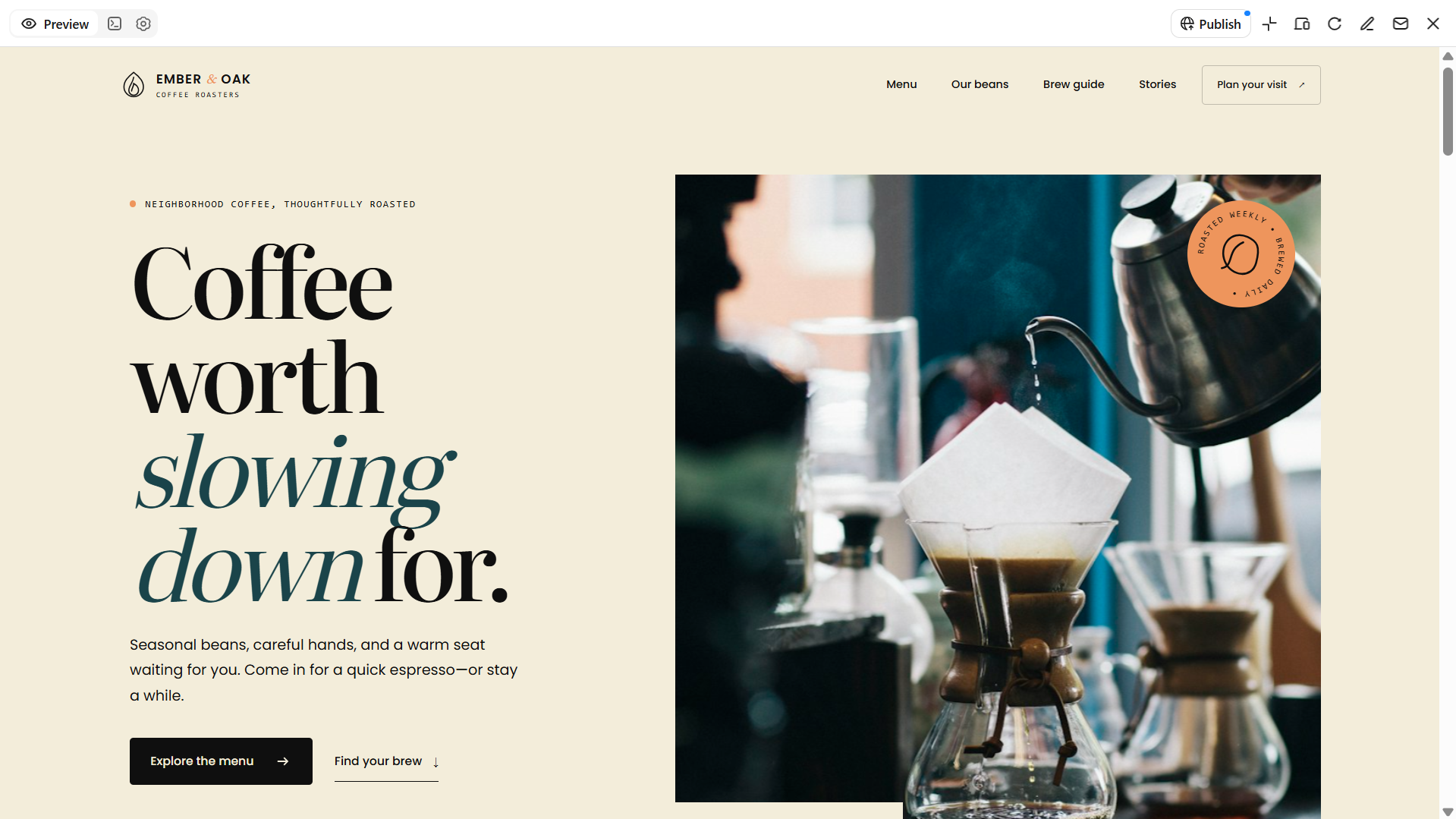
A specialty coffee shop requires a website that showcases its focus on excellence, taste, and the craft of making coffee. This café website template design is suitable for cafés that provide carefully sourced beans, pour-over coffee, and distinct beverages. You should use sharp images, an organized layout, and well-defined menu categories to help customers discover what your café has to offer. You can also provide information about your coffee beans and brewing techniques to encourage customers to come by.
How to use
Step 1: Enter your prompt
Open Kimi Build and describe your specialty coffee shop, signature drinks, and preferred design style.
Prompt:
Step 2: Let AI generate your website
Let Kimi Build generate the website, then review the coffee menu, product gallery, and bean information.
Step 3: Review and publish
Check drink descriptions, prices, contact details, and navigation. Make any necessary changes, then publish your website using Kimi Build's publishing options.
Bakery café template
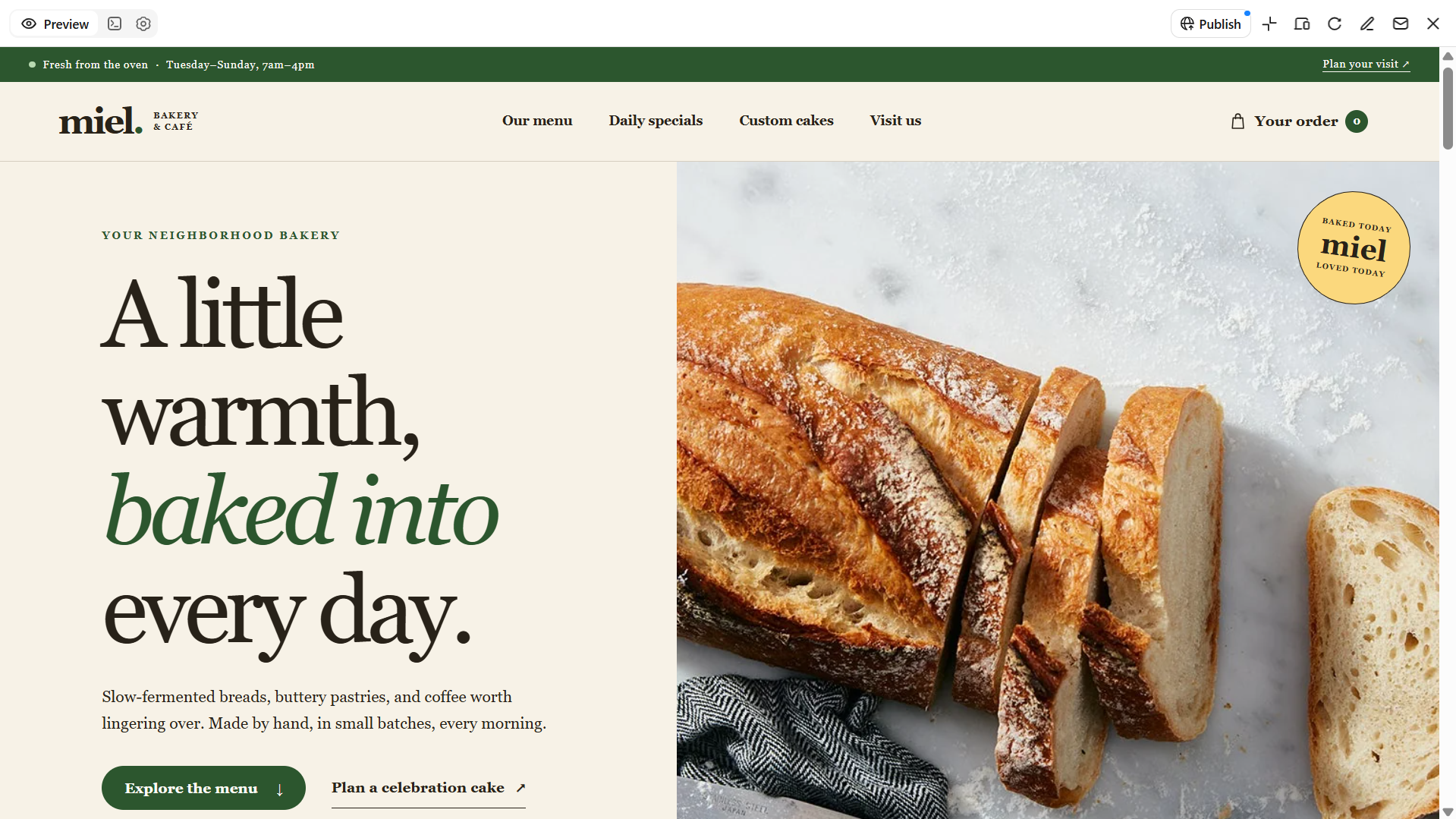
A bakery café requires a website that tempts visitors to try its freshly made treats and beverages. This café website template design is suitable for startups and businesses that offer bread, pastries, cakes, and coffee together. Use cozy colors, appealing images of food, and an easy-to-read menu to display your offerings. Moreover, you can feature special items of the day and personalized orders to help customers to decide on their next visit.
How to use
Step 1: Enter your prompt
Open Kimi Build and describe your bakery café, freshly baked goods, signature desserts, coffee menu, and preferred website style.
Prompt:
Step 2: Let AI generate your website
Let Kimi Build generate your bakery café website based on the prompt. Review the layout, bakery gallery, coffee menu, and daily specials section.
Step 3: Review and publish
Check product descriptions, prices, custom-order details, and contact information. Make any necessary adjustments, then publish your website using Kimi Build's publishing options.
Brunch café template
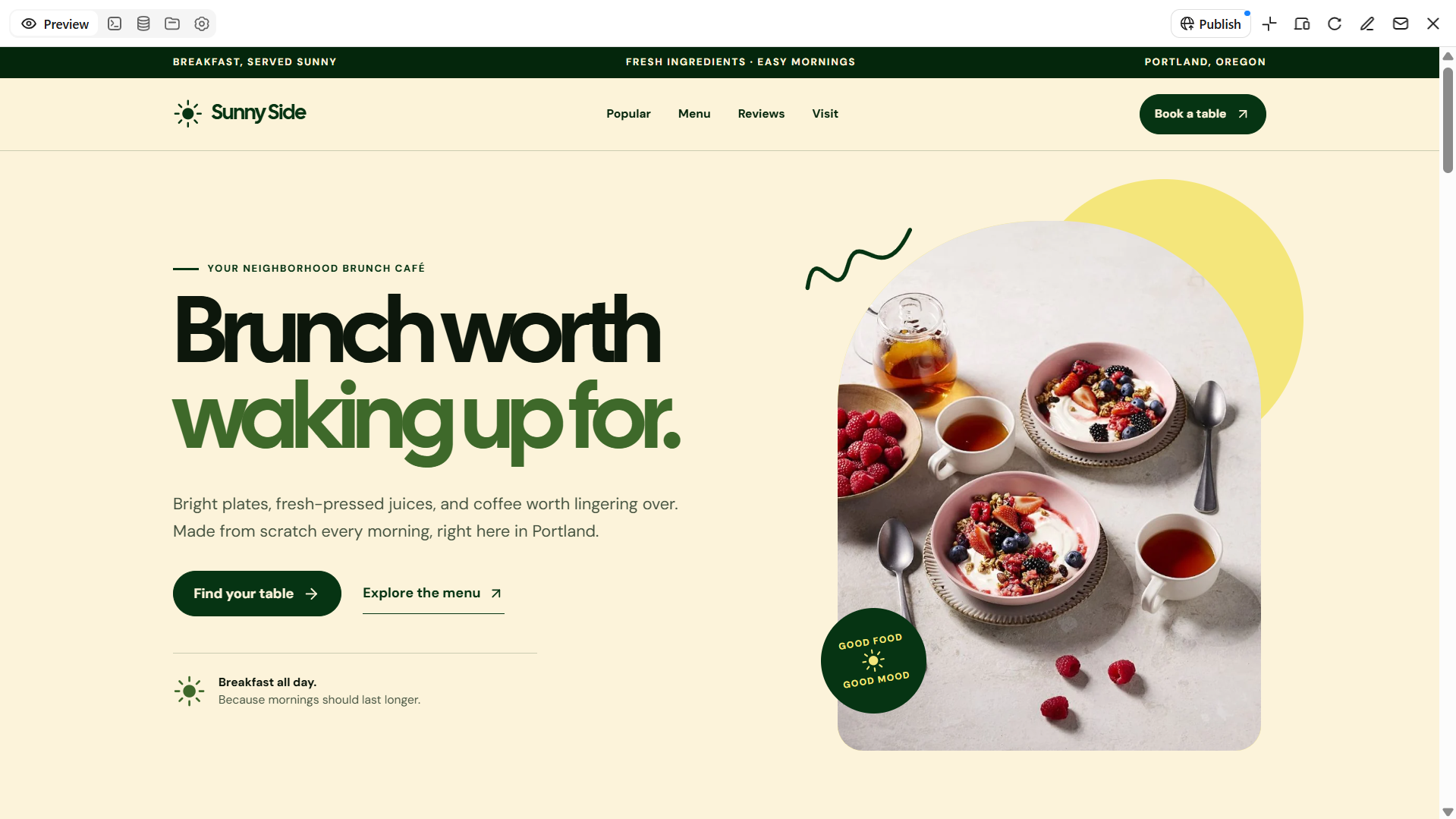
A brunch café template requires a website that displays its meals, beverages, and relaxed dining atmosphere. A brunch café website template design is perfect for cafés that offer breakfast classics, pancakes, sandwiches, and refreshing juices. Use vibrant colors, enticing food images, and a user-friendly menu to help visitors discover your selections. Also, you can emphasize favorite dishes, business hours, and reservation options to attract more customers.
How to use
Step 1: Enter your prompt
Open Kimi Build and describe your book café, coffee offerings, book collection, reading areas, and your preferred website design.
Prompt:
Step 2: Let AI generate your website
Let Kimi Build generate your brunch café website based on the prompt. Review the menu layout, featured dishes, food gallery, and reservation section.
Step 3: Review and publish
Check menu items, prices, opening hours, and reservation details. Make any necessary adjustments, then publish your website using Kimi Build's publishing options.
Book café template
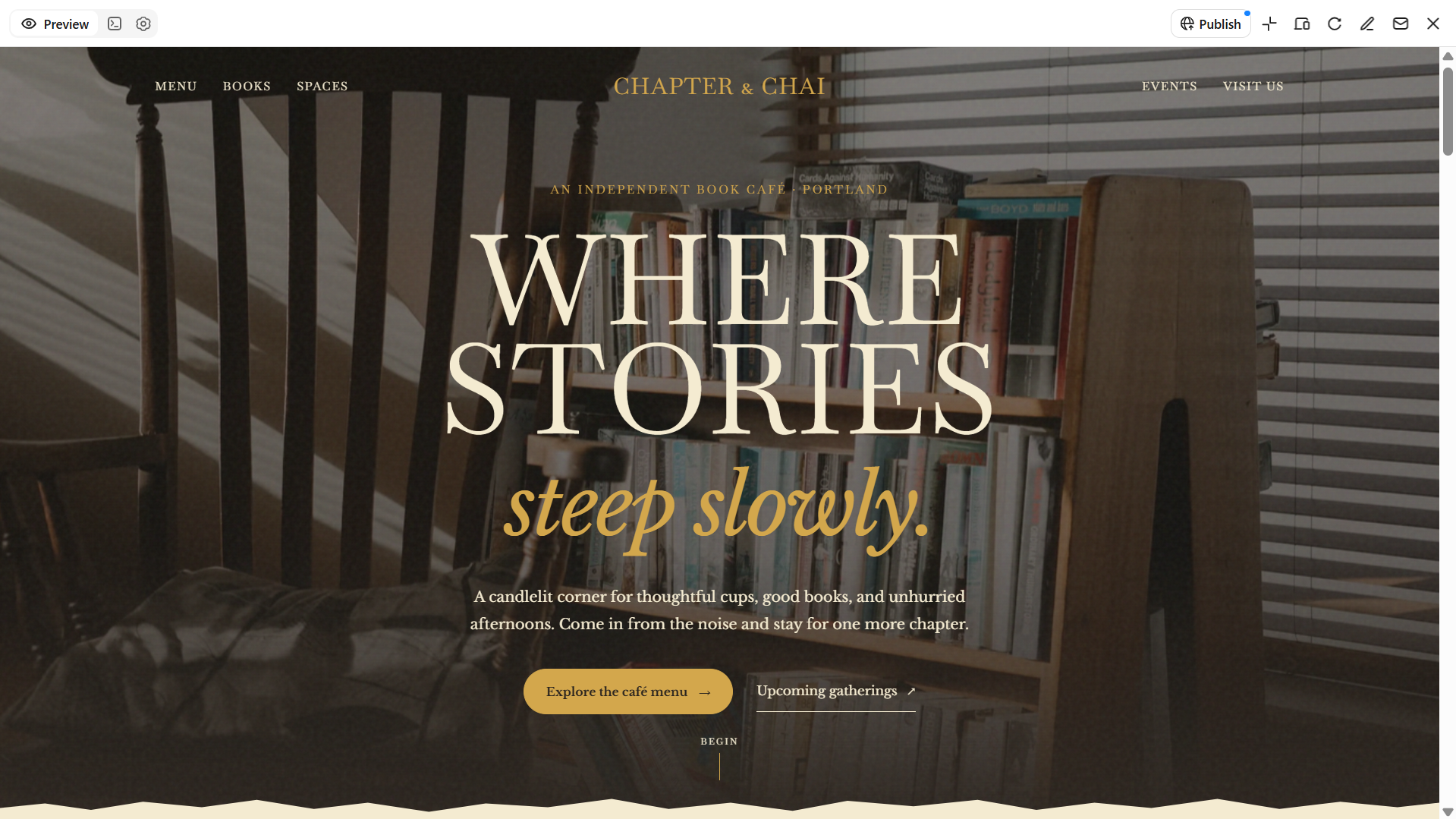
A book café blends the comfort of a coffee shop with the charm of a reading space. A café website template for this concept should feature warm colors, cozy interior photos, and clean typography. Include your book collection, café menu, and upcoming literary events to create a welcoming online experience and encourage visitors to explore your space.
How to use
Step 1: Enter your prompt
Open Kimi Build and describe your book café, coffee menu, book collection, and preferred design style.
Prompt:
Step 2: Let AI generate your website
Let Kimi Build generate your book café website based on the prompt. Review the layout, café menu, book collection, and literary events section.
Step 3: Review and publish
Check menu details, book listings, event information, and opening hours. Make any necessary adjustments, then publish your website using Kimi Build's publishing options.
Vegan café template
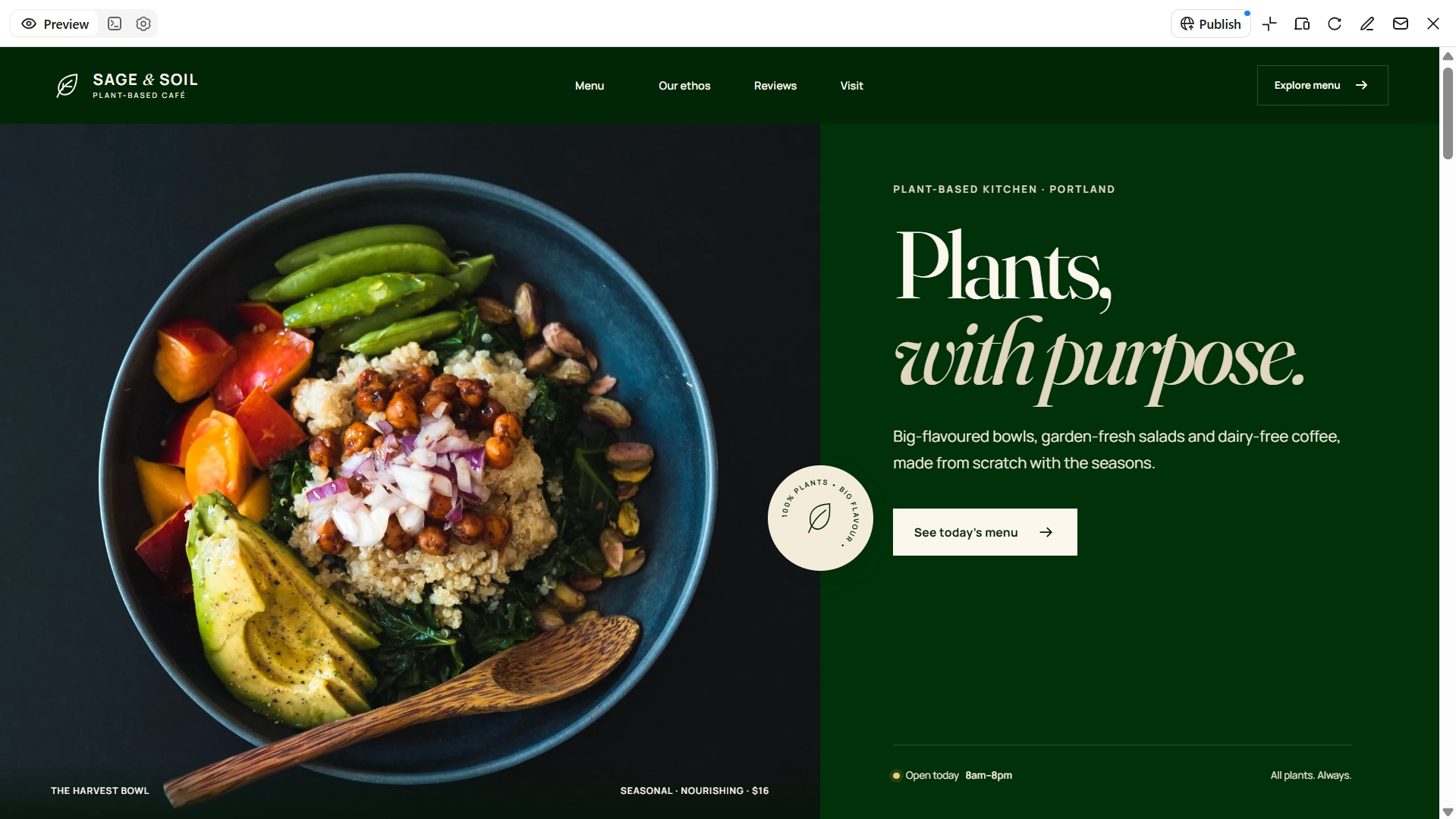
A website for a vegan café must showcase fresh produce, meals made from plants, and healthy drink options. A vegan café website template works well for cafés that serve vegan bowls, coffee without dairy, smoothies, and vegetarian bites. Use earthy colors, appealing food images, and a neat layout to represent the main values of your café. Adding details about ingredients and favorite dishes can help customers discover choices that match their tastes.
How to use
Step 1: Enter your prompt
Open Kimi Build and describe your vegan café, plant-based menu, signature drinks, fresh ingredients, and preferred website style.
Prompt:
Step 2: Let AI generate your website
Review the proposed layout, plant-based menu, food gallery, ingredient details, and sections highlighting vegan and dairy-free options.
Step 3: Review and publish
Check menu items, prices, ingredient information, dietary labels, opening hours, contact details, and mobile responsiveness before launching your website.
Cat café template
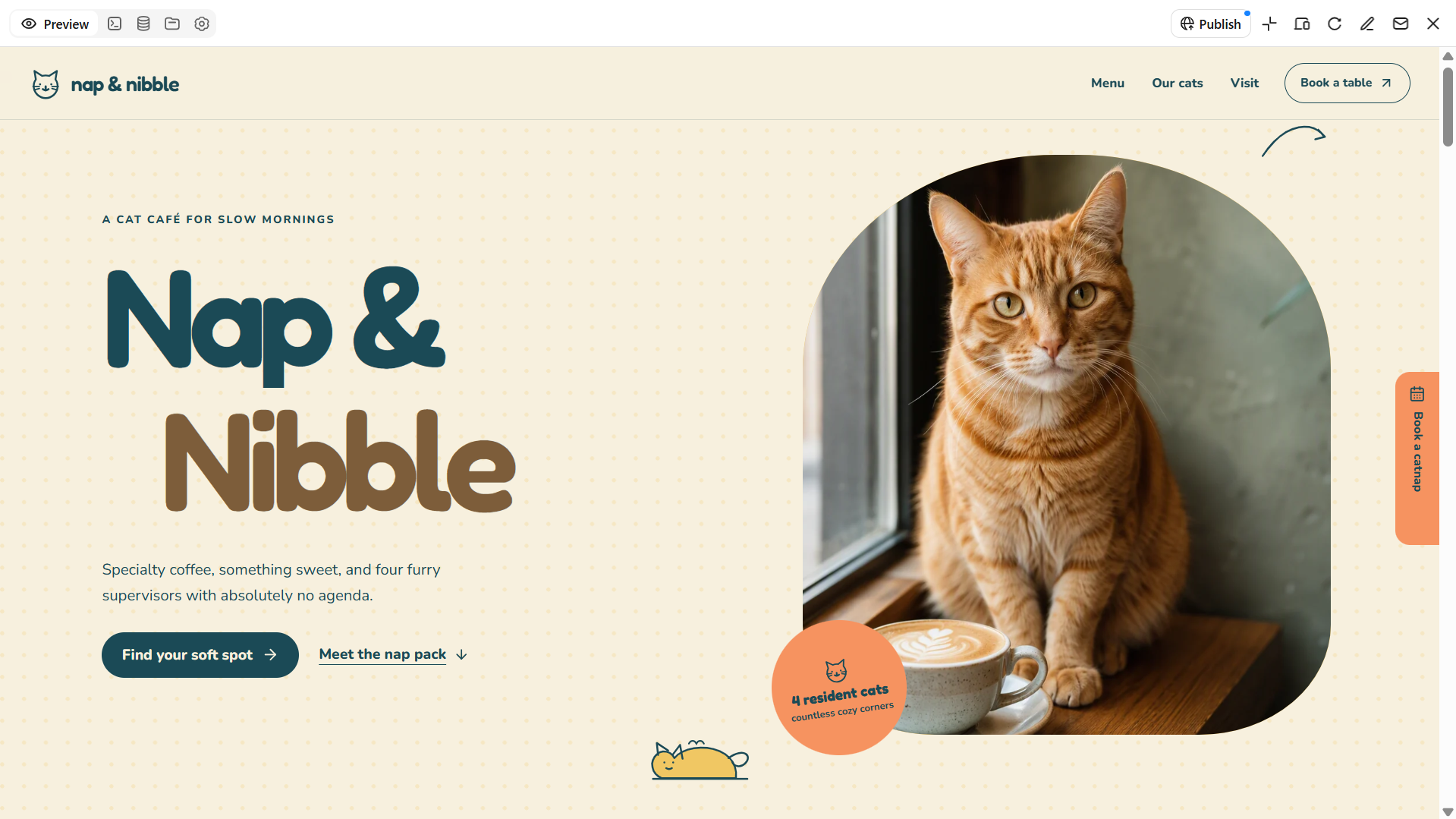
A cat café provides guests the opportunity to unwind and spend time with nice cats in addition to coffee and food. This café website template is perfect for cafés that combine animal friendship with a warm café atmosphere. To express the café's character, use charming cat pictures, bright colors, and an inviting arrangement. To assist guests in planning their visit, you can also provide booking information, cat profiles, and visiting rules.
How to use
Step 1: Enter your prompt
Access Kimi Build and write a prompt describing your cat café, food and drink menu, resident cats, visitor experience, and preferred website style.
Prompt:
Step 2: Let AI generate your website
Let Kimi Build generate your cat café website based on the prompt. Review the design, cat profiles, menu section, and visitor booking options.
Step 3: Review and publish
Check cat profiles, visiting rules, menu details, booking information, and opening hours.
Coffee roastery template
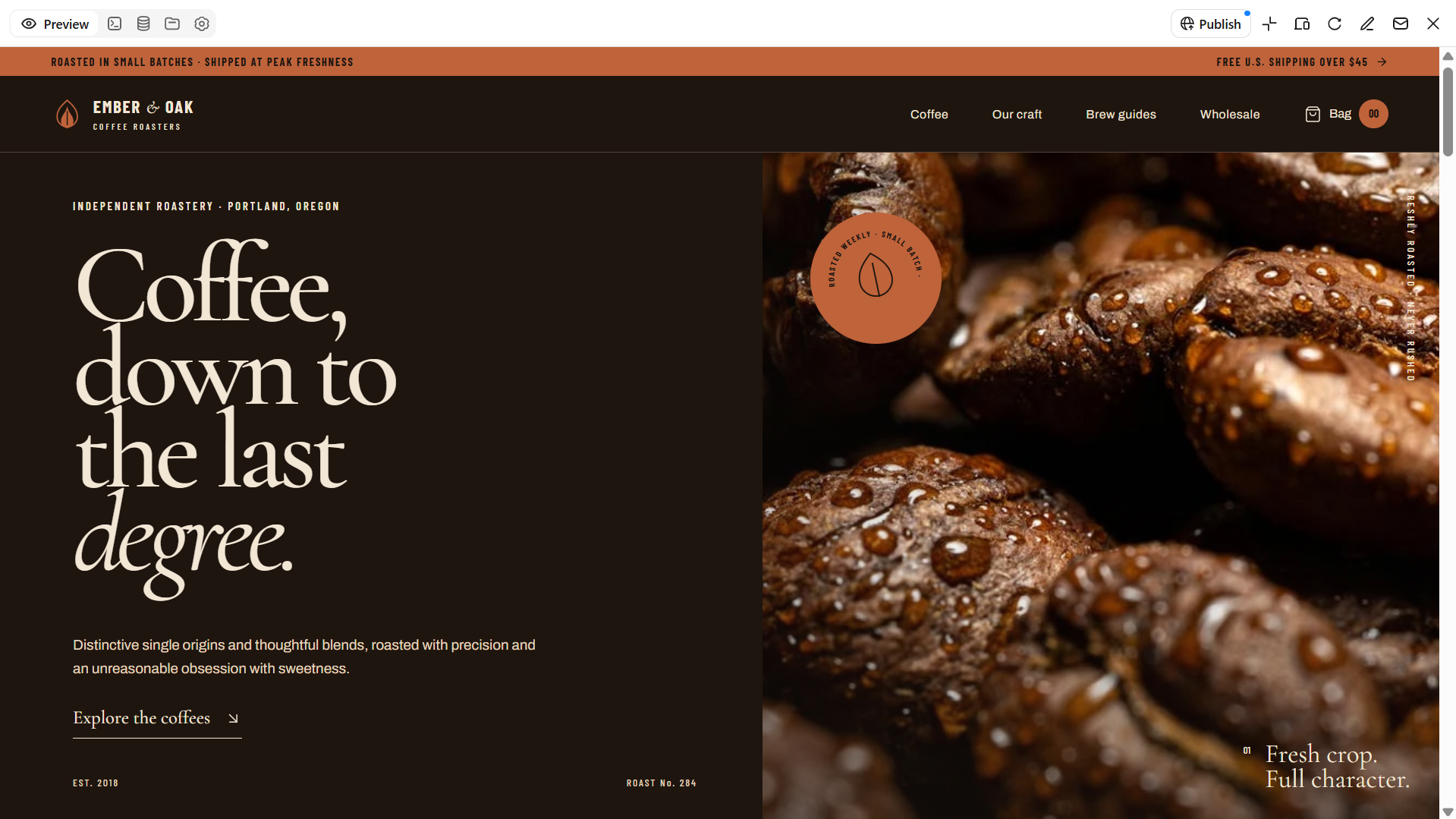
A coffee roastery requires a website that emphasizes its dedication to quality, roasting technique, and beans. Businesses that roast their own coffee and sell it to home brewers, cafés, or shops will find this café website template to be ideal. Showcase your coffee selection with rich designs, vibrant hues, and crisp images of your items. You can also share brewing advice, bean origins, and roast profiles to help customers choose the right coffee.
How to use
Step 1: Enter your prompt
Open Kimi Build and through a prompt describe your coffee roastery, bean varieties, roasting methods, target customers, and preferred website style.
Prompt:
Step 2: Let AI generate your website
Let Kimi Build generate your coffee roastery website based on the prompt. Review the bean catalog, product gallery, roast profiles, and wholesale section.
Step 3: Review and publish
Check bean descriptions, roast details, product prices, and wholesale contact information.
Dessert café template
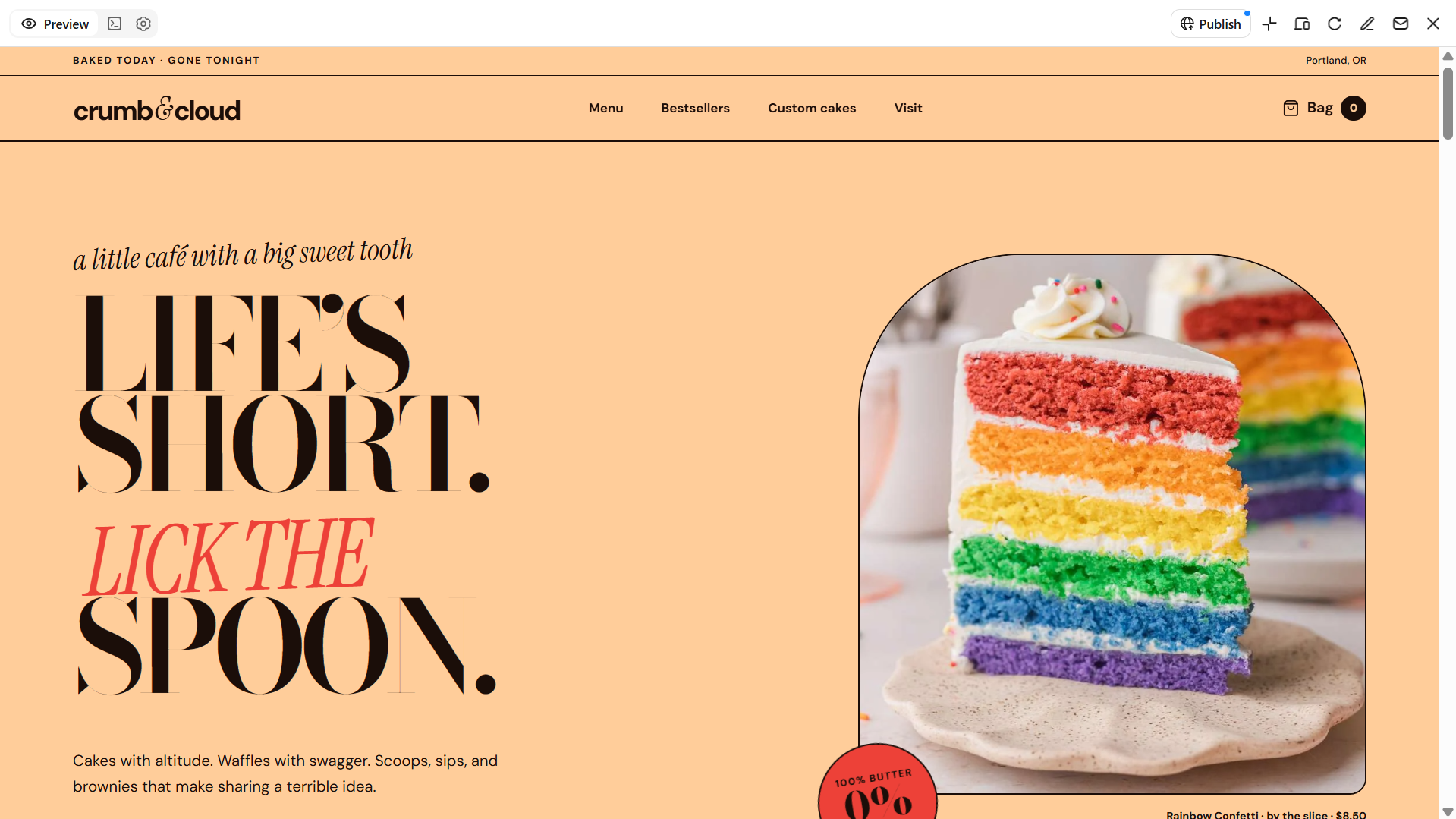
A dessert café needs a website that makes its sweet treats look as tempting online as they do in person. This café website template design is perfect for shops that offer cakes, waffles, brownies, ice cream, and various other sweets. Utilize bright colors, eye-catching images of the food, and an organized design to highlight each product. You can also display popular items, seasonal specialties, and personalized orders in a café menu website template to assist customers in finding their new favorite sweet treat.
How to use
Step 1: Enter your prompt
Open Kimi Build and describe your dessert café, signature sweets, menu options, and preferred design style.
Prompt:
Step 2: Let AI generate your website
Let Kimi Build generate your dessert café website based on the prompt. Review the dessert gallery, menu categories, bestsellers, and custom-order section.
Step 3: Review and publish
Check dessert descriptions, prices, custom-order details, and contact information. Make any necessary adjustments, then publish your website using Kimi Build's publishing options.
Garden and outdoor café template
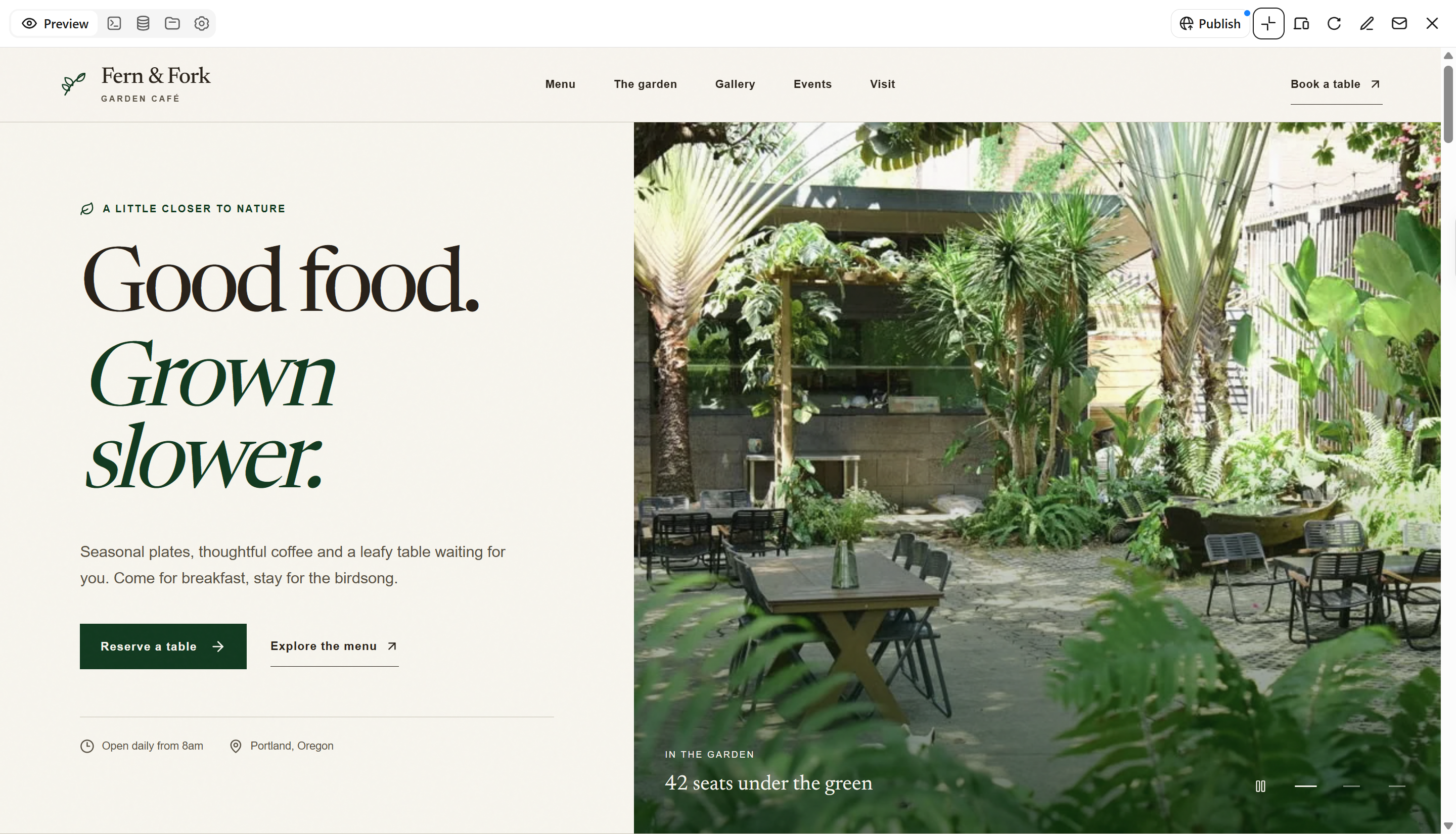
A garden café offers guests a place to enjoy wonderful cuisine and drinks while surrounded by greenery and fresh air. This design is ideal for restaurants with outside seating, views of gardens, or a serene natural setting. To highlight the appeal of the place, use natural tones, large outdoor photographs, and a straightforward garden café website template design. It's also a good idea to promote seating areas, seasonal meals, and event possibilities to help people plan their next visit.
How to use
Step 1: Enter your prompt
Open Kimi Build and describe your garden café, outdoor seating, menu, and preferred design style.
Prompt:
Step 2: Let AI generate your website
Let Kimi Build generate your garden café website based on the prompt. Review the outdoor seating gallery, menu, garden photos, and event information.
Step 3: Review and publish
Check menu details, opening hours, location information, and event details before going live.
Mobile coffee shop template
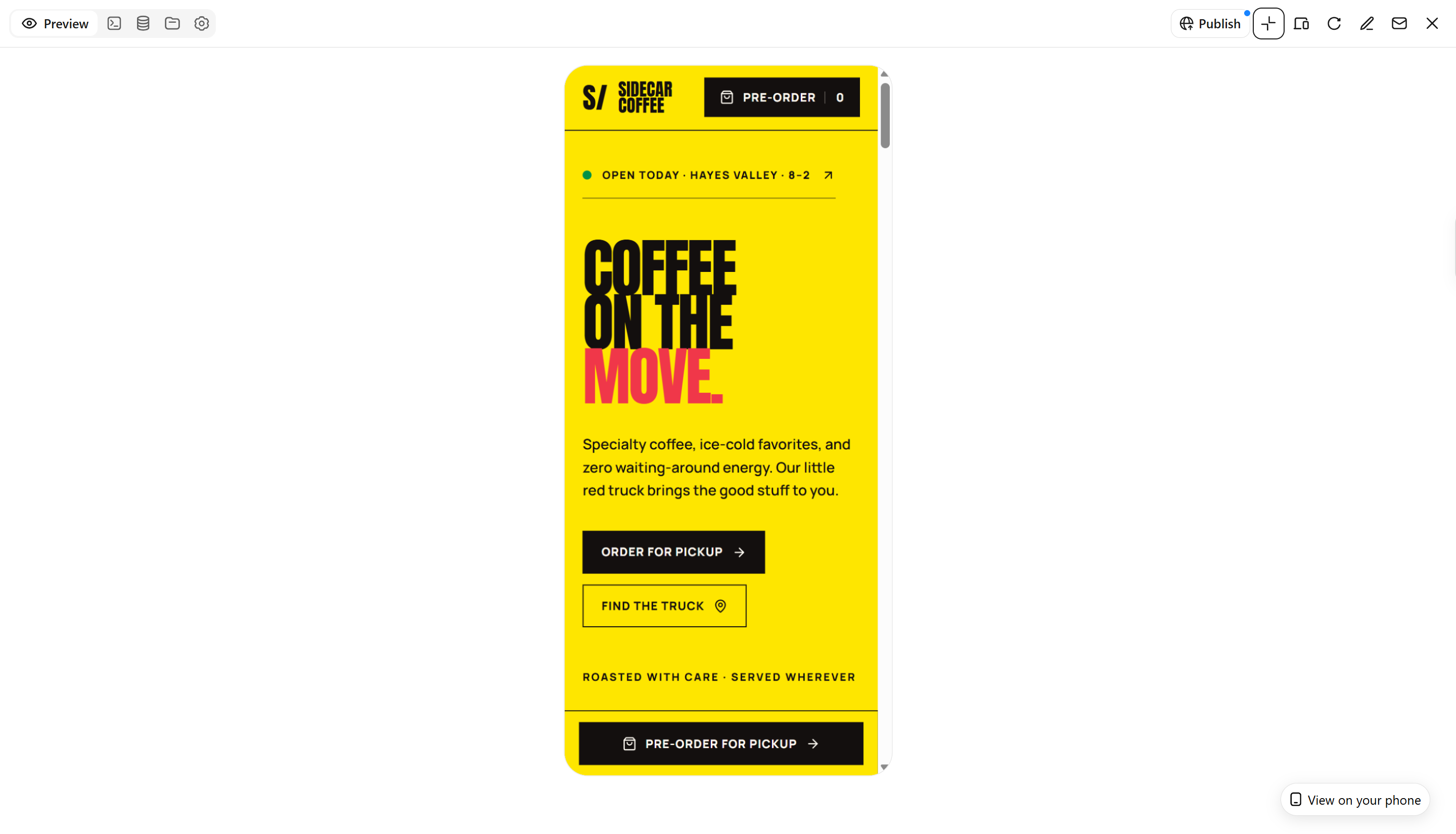
A mobile coffee shop needs a website that allows your customers to find out where it will be next and check the menu while they are on the go. This design is ideal for coffee trucks, seasonal kiosks, and startups that serve drinks at festivals or events. It is important to include attractive pictures and well-organized menu sections in your mobile café website template. You can share information about your locations, schedules for events, and choices for placing orders in advance to help customers find you.
How to use
Step 1: Enter your prompt
Open Kimi Build and describe your mobile coffee shop, drink menu, service locations, and preferred design style.
Prompt:
Step 2: Let AI generate your website
Let Kimi Build generate your mobile coffee shop website based on the prompt. Review the drink menu, location section, event schedule, and pre-order options.
Step 3: Review and publish
Check menu prices, service locations, event dates, and ordering links. Make any necessary adjustments, then publish your website using Kimi Build's publishing options.
Why choose Kimi Build to design café websites
Kimi Build simplifies the process of making café website templates without needing to begin anew or handle complicated design software. You can outline your café, select the necessary features, and allow AI to transform your concepts into a website that aligns with your brand.
Capture the character of your café online
Describe your café's atmosphere, coffee style, brand identity, and preferred visual direction in natural-language prompts, or upload reference images to inspire the design. Kimi Build transforms your input into a customized website with tailored layouts, visual styles, and image arrangements that showcase your café's personality and coffee culture.
Give your coffee menu and story room to shine
Present specialty coffee, signature drinks, pastries, seasonal offerings, and the story behind your café across dedicated pages. Kimi Build supports multi-page websites and custom functionality to accommodate different café concepts and business needs.
Fine-tune every detail as your brand evolves
Adapt your café website by describing the changes you want in natural language. Refresh the color palette, revise drink descriptions, rearrange sections, or adjust typography while keeping other parts of the design intact.
Make your café website work across screens
Responsive layouts adapt to desktop, tablet, and mobile devices. Kimi Build helps ensure that images, text, page sections, and navigation adjust to different screen sizes for a consistent browsing experience.
Take your website from preview to publication
Review your café website before publishing it through a shareable link. Kimi Build also provides access to generated source code for supported website types, including HTML, React-based static sites, and full-stack applications, depending on the project.
Tips for creating an effective café website
A good café website template should reflect the experience customers can expect when they walk through your doors. Keep these tips in mind to create a site that looks inviting and gives visitors the information they need.
Let your café's atmosphere guide the design
Align the colors, typefaces, and photos on your website with the environment of your café. While a modern coffee shop might appear great with a simple, clean layout, a cozy book café might go well with warm tones.
Give signature drinks their own spotlight
Use eye-catching images and short descriptions to showcase your best-selling coffee, seasonal lattes, or inventive drink combinations. This makes it easier for customers to find out what makes your cuisine unique.
Tell the story behind your coffee
Talk about how you make your drinks, where your beans came from, or what motivated you to start the café. Your story behind your coffee will give your customers a better sense of your brand and what sets it apart.
Make the visit easy to plan
Put your menu, contact information, location, and hours of operation on display so that visitors can easily discover them. Provide easy access to online ordering and booking options if you accept them.
Create content around seasonal changes
Refresh your site with seasonal beverages, special treats, and exclusive events year-round. New content offers returning customers fresh experiences while ensuring your menu stays current.
Keep the website visually consistent with your café
Use the same brand colors, fonts, logo, and style of photos across your website. A cohesive design helps your café be more easily identified and enhances its professional look.
Conclusion
Selecting the appropriate café website templates enables you to build a website that both reflects the aesthetic of your café and facilitates clients' exploration of your offerings. Every design, from mobile coffee trucks to specialty coffee shops, may be customized to fit your brand, menu, and business requirements. With Kimi Build, you can turn your ideas into a website without starting from scratch. Focus on clear menus, appealing photos, and useful details to give visitors a reason to stop by.