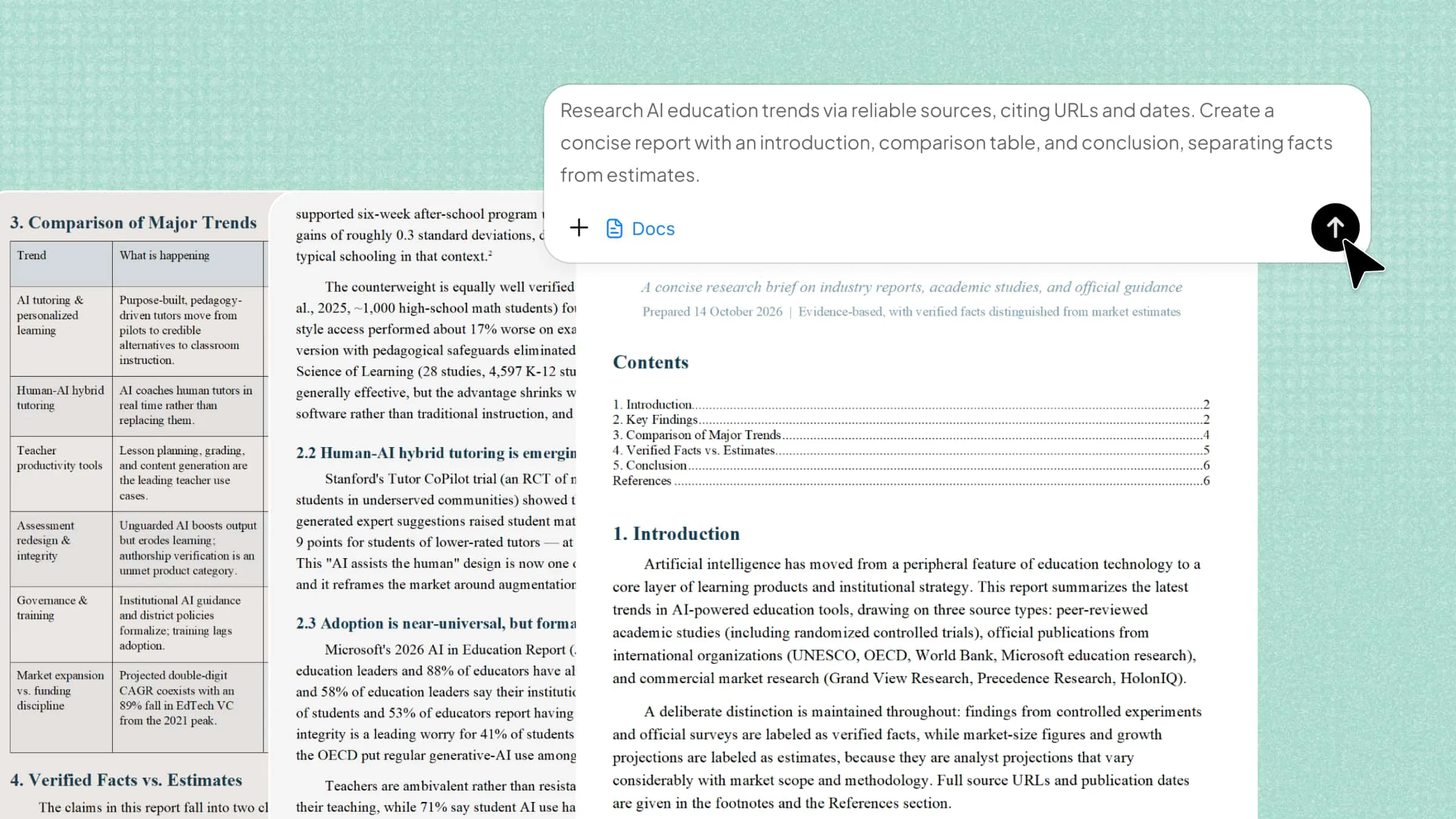
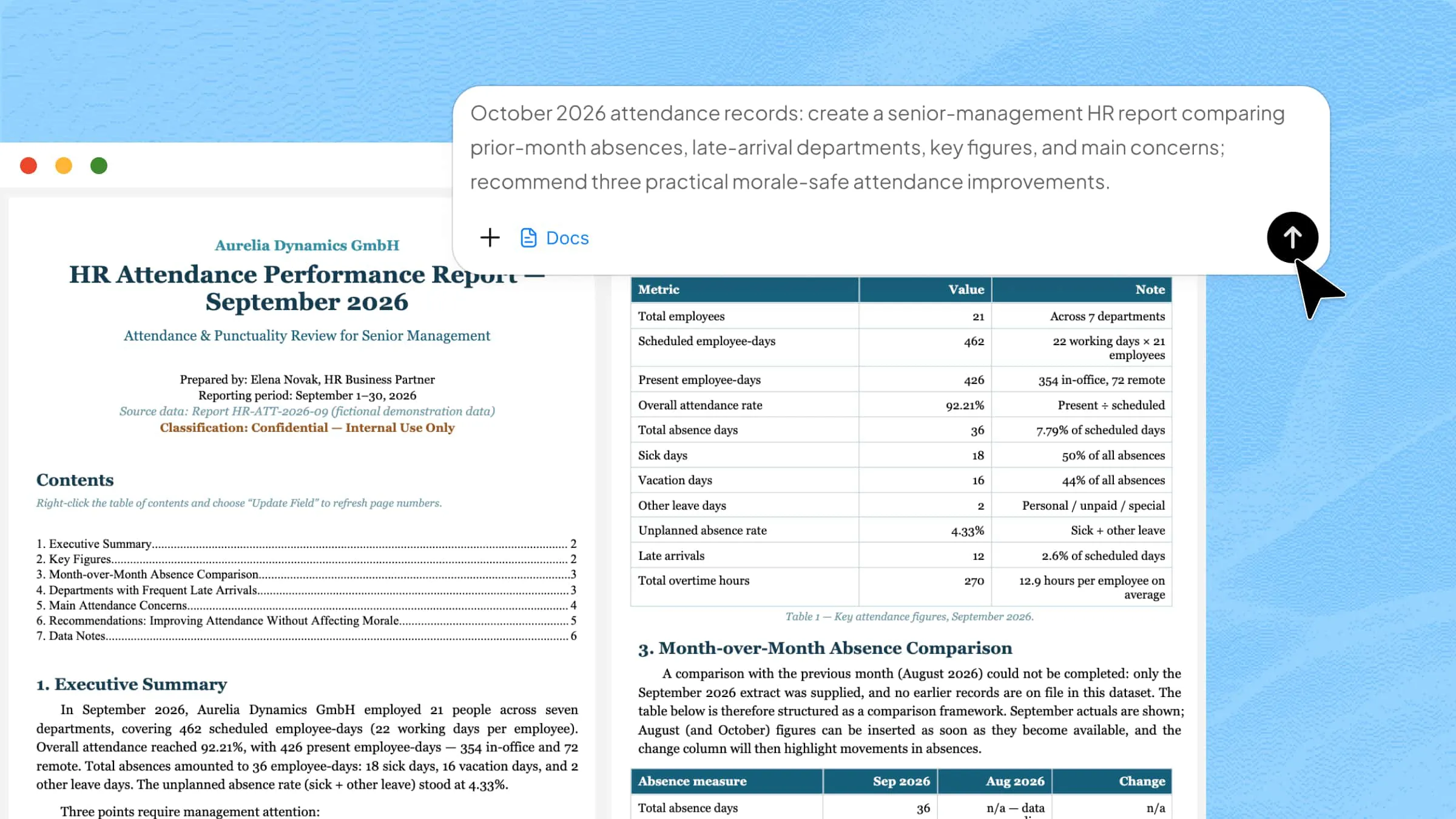
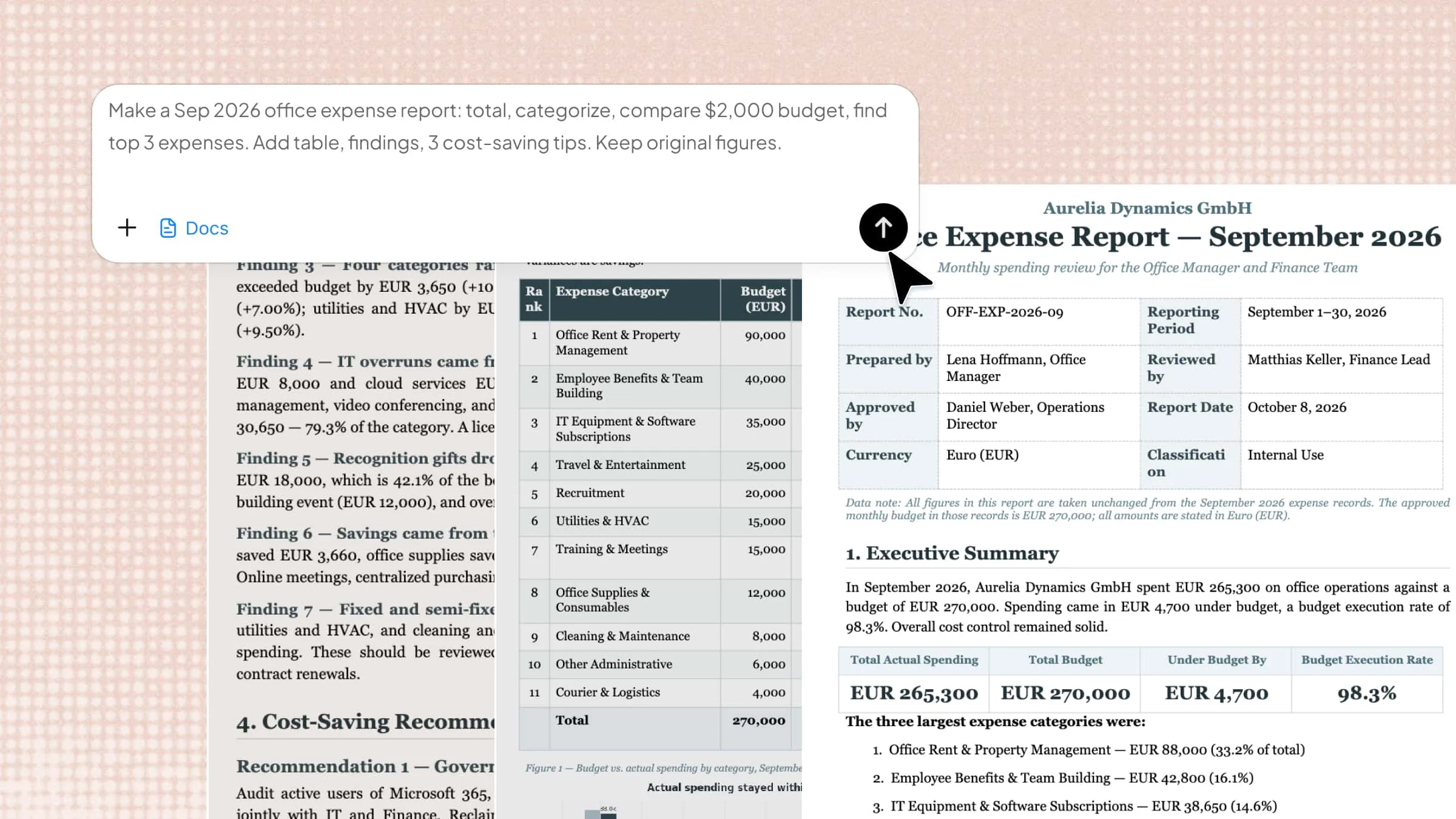
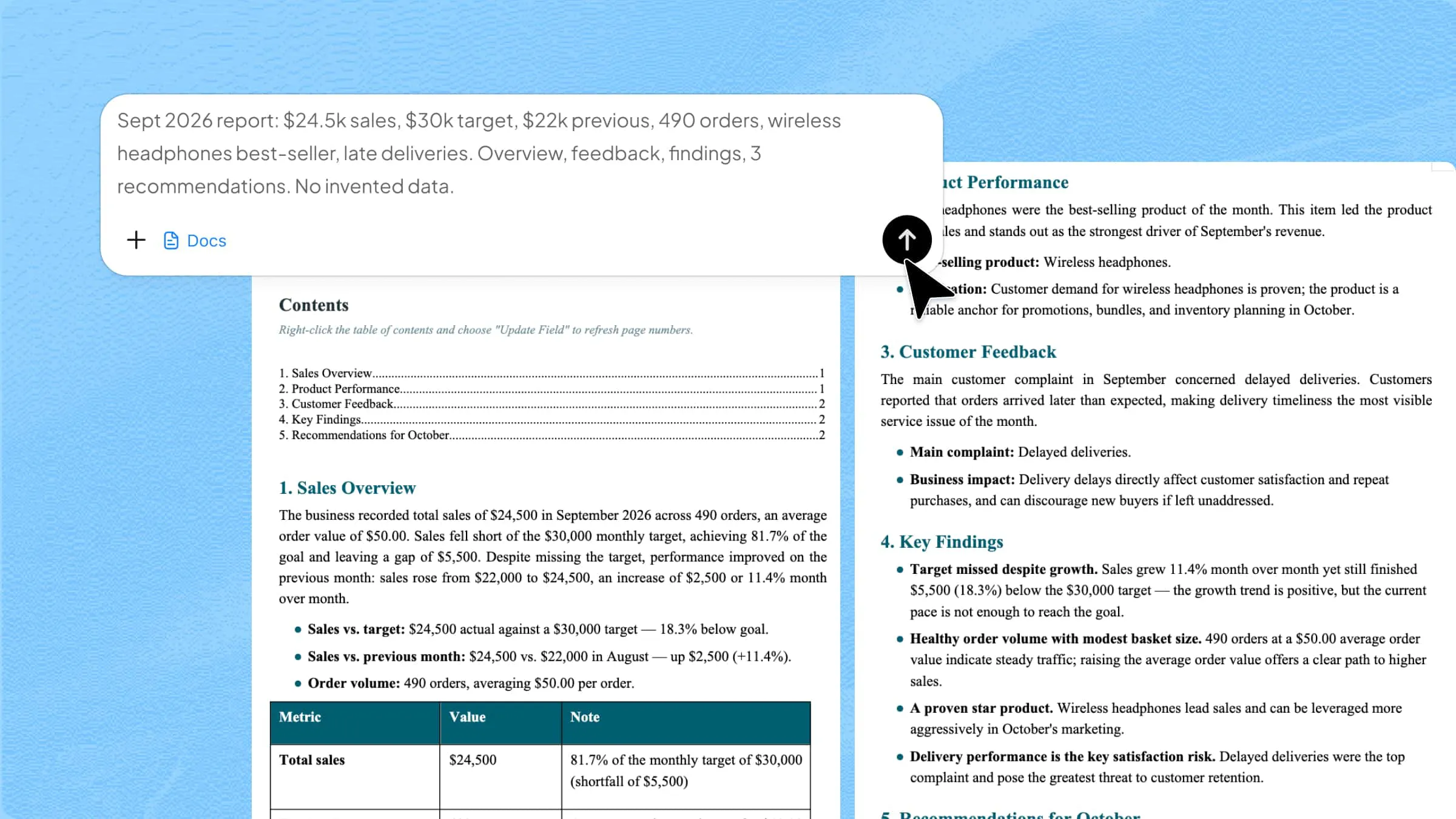
A company profile is often the first thing people see when they want to learn about your business, so making a good impression matters. However, putting together a profile that feels professional, clear, and interesting can be challenging. A well-designed company profile PDF makes it easier to present your brand, services, and key details in a polished way. Explore the templates in this article to find a style that suits your business and makes your profile stand out.
Overview of 10 company profile PDF designs
Different company profile designs work better for different industries, goals, and presentation styles. The table below highlights the key differences to help you choose the right one for your business.
| Profile design | What to highlight | Recommended style | Suitable for |
|---|---|---|---|
| Corporate profile | Company overview, credibility, and key information | Clean and formal | Established businesses |
| Creative agency profile | Services, portfolio, and creative identity | Bold and expressive | Creative agencies |
| Tech startup profile | Product, growth, and business potential | Modern and futuristic | Early-stage tech companies |
| Consulting firm profile | Expertise, services, and results | Executive and structured | Consulting businesses |
| Finance company profile | Services, financial strength, and trust | Refined and professional | Financial services companies |
| Marketing agency profile | Campaigns, services, and performance | Dynamic and energetic | Marketing agencies |
| Manufacturing business profile | Products, production, and capabilities | Industrial and technical | Manufacturers |
| SaaS company profile | Product features and digital capabilities | Interface-inspired | Software companies |
| Corporate brochure profile | Brand story, offerings, and key information | Editorial and promotional | Diverse businesses |
| Real estate company profile | Properties, projects, and achievements | Premium and image-led | Real estate businesses |
10 company profile PDF templates worth trying
Creating a company profile that feels professional doesn't have to mean starting from scratch. With the right layout and tools, you can bring your brand story, services, and key details together without making the design feel crowded.
Kimi Docs, an AI document agent, helps you turn your business information into well-structured documents with AI-assisted writing and formatting. You can organize your content, refine the wording, and build a polished company profile without spending hours on manual formatting. It's useful for creating clear business documents while keeping the content easy to follow. Now, let's look at 10 company profile example PDF templates worth trying.
Corporate profile
A corporate profile gives a clear overview of an established company, including its background, services, values, and achievements. It is useful for introducing a business to clients, partners, investors, and other stakeholders. A formal structure and clean presentation help build trust and credibility.
How to use
Step 1: Enter your prompt
Enter a prompt that describes the company's background, services, values, achievements, and contact details, along with the formal corporate style you want for the profile.
Prompt:
Step 2: Let AI generate your PDF
Kimi Docs organizes the company overview, services, statistics, values, and contact details into a polished corporate PDF with a clear visual hierarchy.
Step 3: Review and export the PDF
Check that the business information is accurate, the hierarchy is easy to scan, and all sections remain readable before exporting the finished profile.
Creative agency profile
A creative agency profile focuses on personality, services, and visual identity rather than formal corporate information alone. It can highlight areas such as branding, design, advertising, and content creation. This format works well for attracting clients who want to quickly understand an agency's creative strengths.
How to use
Step 1: Enter your prompt
Describe the agency's creative services, portfolio highlights, client results, and brand personality, and ask for a bold layout that reflects its creative work.
Prompt:
Step 2: Let AI generate your PDF
The AI turns the agency's services, client results, introduction, and portfolio elements into a visually driven profile.
Step 3: Review and export the PDF
Review the portfolio visuals, service labels, and client results to make sure the slide represents the agency's creative identity clearly.
Tech startup profile
A tech startup profile presents a young company, its product, market, and growth potential in a compact format. It is useful for pitching the business to investors, customers, and potential partners. Product details and key growth figures should be easy to spot at a glance.
How to use
Step 1: Enter your prompt
Provide the startup's product, key features, target market, business model, and growth metrics, then specify a modern technology-focused visual style.
Prompt:
Step 2: Let AI generate your PDF
Kimi Docs arranges the startup's product information, market focus, business model, and growth metrics into a compact investor-style profile.
Step 3: Review and export the PDF
Verify the product claims and metrics, then check that the main value proposition and growth figures stand out before exporting.
Consulting firm profile
A consulting firm profile should communicate expertise, services, and measurable business value. It is commonly used when introducing a consultancy to potential clients or corporate decision-makers. A professional structure helps make the firm's capabilities and results easy to understand.
How to use
Step 1: Enter your prompt
Add the consultancy's areas of expertise, client outcomes, industry focus, and value proposition, while asking for a professional layout suited to business decision-makers.
Prompt:
Step 2: Let AI generate your PDF
The AI combines the consultancy's capabilities, client outcomes, and value proposition into an executive-focused profile.
Step 3: Review and export the PDF
Check that the services are clearly separated from the results and that the strongest proof points are immediately visible.
Finance company profile
A finance company profile should create a sense of trust while presenting its services and financial strengths clearly. It can introduce banking, investment, lending, wealth management, or other financial services. Clean data presentation and a professional tone are especially important for this format.
How to use
Step 1: Enter your prompt
Include the company's financial services, experience, client base, key figures, and trust statement, with instructions for a refined and credible financial design.
Prompt:
Step 2: Let AI generate your PDF
Kimi Docs places financial services, company statistics, experience, and investment message into a trust-focused profile.
Step 3: Review and export the PDF
Double-check every financial figure and make sure the design remains professional, balanced, and easy to read before exporting.
Marketing agency profile
A marketing agency profile showcases the agency's ability to build awareness, generate leads, and grow brands. It can feature core services, campaign results, audience expertise, and creative capabilities. A lively visual style helps communicate the agency's energy and marketing focus.
How to use
Step 1: Enter your prompt
Describe the agency's marketing services, campaign results, specialties, and performance metrics, and request a dynamic design that highlights measurable results.
Prompt:
Step 2: Let AI generate your PDF
The AI turns the agency's marketing services and campaign results into a visual, results-driven profile.
Step 3: Review and export the PDF
Review the campaign metrics, service descriptions, and visual examples to ensure they communicate the agency's strengths quickly.
Manufacturing business profile
A manufacturing profile introduces a company's production capabilities, products, facilities, and industry experience. It is useful for suppliers, distributors, buyers, and business partners evaluating a manufacturer. Technical details should be presented clearly without making the page feel overloaded.
How to use
Step 1: Enter your prompt
Enter the manufacturer's products, production capabilities, industries served, certifications, capacity, and experience, with a clean industrial layout that presents technical information clearly.
Prompt:
Step 2: Let AI generate your PDF
Kimi Docs organizes manufacturing capabilities, industries, certifications, capacity, and company experience into a technical profile.
Step 3: Review and export the PDF
Confirm that production figures, certifications, and capabilities are correct and that technical information remains easy to scan.
SaaS company profile
A SaaS profile explains a software company through its product, customers, key features, and business performance. It can be used for sales presentations, partnerships, investor discussions, or company introductions. Product visuals and concise metrics help communicate the platform quickly.
How to use
Step 1: Enter your prompt
Provide the software product, main features, integrations, customer numbers, retention figures, and value proposition, while requesting a modern interface-inspired design.
Prompt:
Step 2: Let AI generate your PDF
The AI presents the SaaS product, features, integrations, and performance metrics around a central software visual.
Step 3: Review and export the PDF
Check that the product features and metrics are accurate and that the dashboard visual supports rather than hides the main information.
Corporate brochure profile
A corporate brochure profile combines company information with a more visual, promotional presentation. It can introduce a business, its offerings, achievements, and brand story in a compact brochure-like format. This approach works well for events, sales meetings, and client introductions.
How to use
Step 1: Enter your prompt
Describe the company story, business divisions, major achievements, offerings, and contact details, and ask for a brochure-style layout with strong imagery and clear sections.
Prompt:
Step 2: Let AI generate your PDF
Kimi Docs arranges the company story, divisions, achievements, and contact details into a brochure-inspired composition.
Step 3: Review and export the PDF
Make sure the images support the brand story and that the key company information remains prominent before exporting.
Real estate company profile
A real estate company profile highlights properties, market expertise, services, and business achievements. It can help agencies introduce themselves to buyers, sellers, investors, and property partners. Strong property imagery combined with clear figures makes the profile more persuasive.
How to use
Step 1: Enter your prompt
Enter the agency's property services, market experience, transaction figures, property categories, and key achievements, while requesting a premium design built around property imagery.
Prompt:
Step 2: Let AI generate your PDF
The AI combines property services, transaction figures, market experience, and property categories into a visually rich real estate profile.
Step 3: Review and export the PDF
Check property categories, transaction figures, and company details, then ensure the property imagery and key statistics are easy to notice.
Why use Kimi Docs to design a company profile PDF
A well-designed company profile should do more than list basic information. It needs to present your business clearly, look professional, and make important details easy to find. Kimi Docs can simplify this process by handling both the content structure and visual presentation. Here's why Kimi Docs can be a practical choice for creating company profile PDFs:
Turn company information into a structured profile: Give Kimi Docs your company details, notes, or existing materials, and let it organize them into sections such as company overview, products, services, achievements, and contact information. Kimi Docs can generate structured Word and PDF documents from natural-language instructions.
Create a professional visual layout automatically: Combine text, images, covers, tables, and other visual elements into a polished company profile instead of manually arranging every page. Kimi Docs supports professional covers, mixed text-image layouts, tables, and visual enhancement for PDFs.
Showcase your brand with richer visual content: Add company images, product visuals, charts, and other supporting elements to make key information easier to scan and the profile more visually engaging.
Create a complete PDF ready to share: Generate a finished PDF with a cover, structured sections, body content, and visual elements, then preview and download it for clients, partners, or internal use.
Update and repurpose existing company materials: Upload an existing Word or PDF company profile and ask Kimi Docs to revise, restructure, or reformat it, so you can refresh outdated materials without rebuilding the document from scratch.
Pro tips when creating a company profile PDF
Your company profile is more effective when every element has a clear purpose. From the opening message to the final CTA, small design and content choices can shape how readers view your business. Use the following tips to make your profile clearer, stronger, and more useful.
Lead with a clear company overview
Start with a short introduction that explains who you are, what your company does, and who you serve. A clear opening gives readers the context they need before moving into your services, achievements, or other details. Keep it simple and avoid filling the first section with too much information.
Highlight key achievements and client testimonials
Show readers what your company has achieved through useful numbers, awards, major projects, or client results. Short testimonials can also add credibility and give potential customers a better idea of what it is like to work with you. Choose only the strongest examples, so the profile stays focused.
Use high-resolution images and consistent branding
Clear, high-quality visuals can make your company profile look more professional and engaging. Use sharp product or team images, and keep your logo, fonts, and other visual elements consistent throughout the document. Looking at brochure-style company profile PDF designs can also give you ideas for combining images and branding effectively.
Keep content concise and easy to scan
Avoid long blocks of text that can make key information easy to miss. Use short paragraphs, clear headings, lists, and visual sections to make the content easier to follow. This matters especially for a branding agency company profile PDF, where the layout should make the information easier to understand.
Include clear contact information
Make it easy for readers to reach your company after viewing the profile. Include relevant details such as your website, email address, phone number, social media accounts, or office location. Place the information where it can be found quickly without searching through the entire PDF.
End with a clear call to action
Give readers an easy way to follow up after learning about your company. You might invite them to schedule a consultation, request a quote, visit your website, or get in touch with your team. For a creative company profile PDF design, make sure the CTA is easy to spot and fits naturally with the rest of the layout.
Optimize the file for sharing and downloading
Keep the PDF high enough in quality to look professional while avoiding an unnecessarily large file size. Check that images display correctly, fonts remain readable, and the document opens smoothly across common devices. A share-friendly PDF is easier to send through email, websites, and messaging platforms.
Update the PDF regularly
Company information can quickly become outdated as services, team members, and contact details change. Review your profile regularly and replace old information with current details. If you use a company profile PDF as a marketing asset, keeping it updated helps ensure every recipient sees accurate information.
Conclusion
A company profile should give people a clear sense of who you are and what your business brings to the table. Choosing the right format can help your message feel more focused while keeping the overall presentation professional. With a clear purpose and thoughtful design, your company profile PDF can become a useful tool for introducing your business. Start creating your company profile with Kimi Docs and see how quickly you can bring your business story together.