What is a desktop pet?
A desktop pet is a small animated character that stays on your computer screen, usually in a floating window, on the taskbar, or along a screen edge. It can follow your cursor, change expressions, and respond when you click or drag it.
Unlike apps you open only when needed, desktop pets stay visible and offer lightweight interaction. A good desktop pet lets you choose when to watch and interact with it, and makes it easy to hide or close.
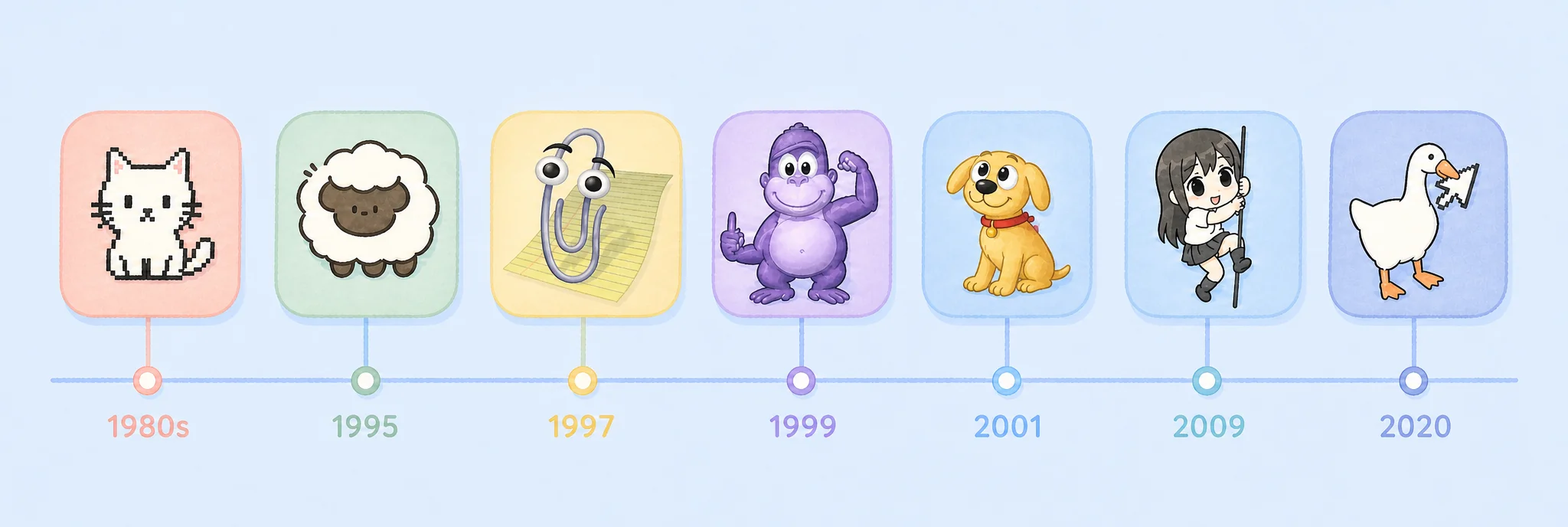
Desktop pets through the years: from animated characters to desktop companions
Desktop pets predate the modern web, with each era producing memorable examples.
Neko (1980s). One of the earliest examples was a small cat that chased the mouse cursor and rested after catching up. It was later ported to X Window System as oneko and continued to appear on the web and in VS Code.
eSheep (1995). A sheep that wandered across windows and the taskbar, fell off edges, and could be picked up and thrown. As older versions of Windows faded, community members rewrote and extended it in C# and other technologies.
Clippy (1997). Microsoft's Office assistant, known for proactive tips. Its frequent interruptions drew criticism, and Microsoft removed it in Office 2007. It showed that helpfulness also depends on timing and restraint.
BonziBuddy (1999). A purple gorilla that told jokes and sang, but was criticized for adware behavior and shut down in 2004. A pet's source, permissions, and data practices matter as much as its appearance and interactions.
Rocky (2001). An Office XP assistant with similar features to Clippy but a gentler presentation. It is a reminder that users care about how assistance appears and behaves, not just what it can do.
Shimeji (around 2009). Small anime characters that fell from the top of the screen, climbed windows, and multiplied. Community forks and remakes kept the concept alive after the original author stopped maintaining it.
Desktop Goose (2020). Sam Chiet built Desktop Goose in two days. It stole the cursor, honked, and dragged memes and muddy footprints across the screen. Its mischievous interactions spread quickly.
These products show two directions: long-term companionship depends on restraint and control, while short-lived entertainment can thrive on exaggerated interactions.
The desktop-pet revival on Steam
After years of quiet, desktop pets found a new audience on Steam.
Desktop Mate (January 2025) brought full 3D characters to the desktop: they can sit on windows, follow the mouse, and tell the time. The base app is free, and the first paid character, Hatsune Miku, cost about $15. The store page specifically emphasizes that the characters do not interrupt your day.
Bongo Cat (2025) sits in a corner of the screen and mirrors your typing and clicks in real time. In June 2025, it reached the top of Steam's concurrent-player charts. Its mechanics are simple, and interaction is entirely up to the user.
Tiny Pasture (February 2025) turns the bottom of the screen into a small idle farm, with pixel animals grazing while you work. It passed 10,000 concurrent players in its first week, following the path of idle games such as Rusty's Retirement.
These products reduce pressure to complete tasks, keep characters at the edge of the screen, and let users choose when to watch and interact. Compared with Clippy, they give more control back to the user.
Two paths for AI desktop pets
Large language models have expanded desktop pets from fixed animations to conversation, contextual understanding, and task updates. Current products broadly follow two paths.
Companion pets focus on character and ongoing interaction. In July 2025, xAI introduced Ani and Bad Rudy, two 3D companions for Grok, with real-time voice and affinity systems. In July 2026, Tencent brought QQ Pets back to mobile QQ with 3D visuals, Hunyuan models, selectable personalities, and a diary feature. Doubao lets users turn character images into floating desktop pets, while Project AIRI explores self-hosted AI companions.
Work pets focus on task status. Codex introduced Pets in May 2026, using characters to show states such as running, waiting for input, and pending review. Tencent WorkBuddy includes a Buddy that blinks and dozes in its office workspace, and the Claude Code community has built several pets that mirror agent states. Editor extensions such as vscode-pets had already shown demand for lightweight companionship among developers.
Conversation and context reduce the repetition of fixed animations, but memory, screen reading, and notifications still need clear user control and transparent data practices.
The Kimi Work desktop pet: expressions and task notifications
Kimi Work is Moonshot AI's desktop agent. It connects to local folders, performs web tasks through a browser extension, runs scheduled jobs, and coordinates agent swarms for complex work. The desktop pet adds a lightweight way to interact with these capabilities, with companionship and status updates.
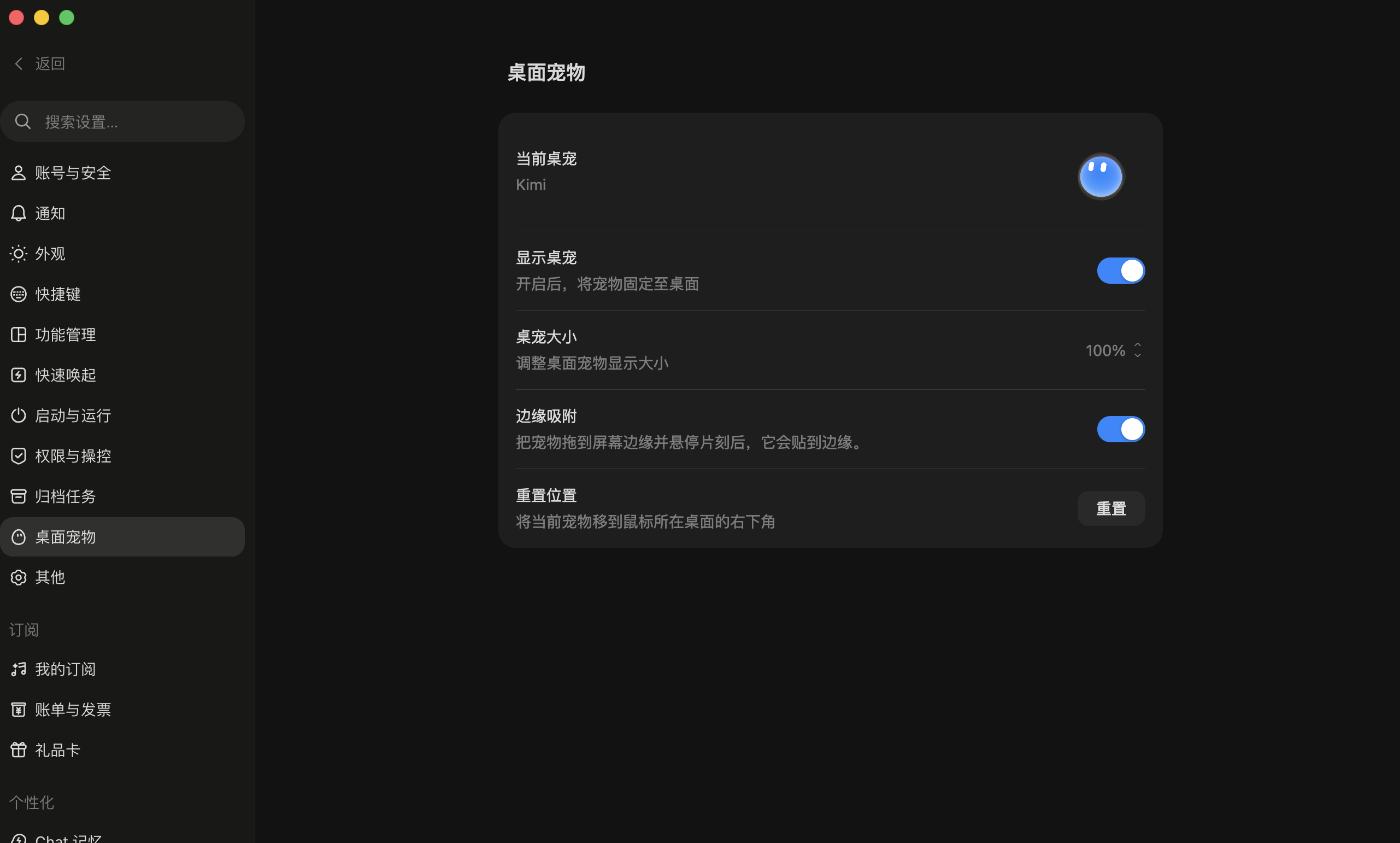
In “Settings → Desktop Pet”, you can show or hide the pet, adjust its size, enable edge snapping, or reset its position to the bottom-right of the current display.
The pet blinks, follows your cursor, and dozes after three idle minutes. Continued petting triggers starry eyes and blushing, shaking leads to a teary expression, and repeated poking makes it angry. Drag it to a screen edge and it turns into a slime-like shape and snaps there. You can also chat in its bubble without opening the main window.
One pet can show many expressions and forms, and you choose how to interact with it.
Task updates also appear in bubbles: check when a task finishes, info when a decision is needed, and error when something fails. Click a bubble to jump to the relevant session. Multiple tasks stack as layered cards: the triangle collapses them to a count, and clicking the card expands the full list.
Task status is collected in bubbles, and stacked cards can be collapsed or expanded.
This combination gives the pet a light companionship role while keeping task progress visible, so you spend less time switching between windows.
Why desktop pets keep coming back
Three lessons recur across three decades:
Give users control. Let people hide, close, resize, and reduce proactive prompts so the pet does not become another source of interruption.
Keep interruptions to a minimum. A pet can stay visible, but interruptions should have clear value and arrive at the right time and frequency.
Offer lasting value. Animation, conversation, and task updates all need to outlast the initial novelty.
Desktop pets keep returning because people still want a more personal digital environment. AI lets that companionship include conversation and task status, but users still need clear choices about what the pet reads, stores, and prompts.
What would you want a desktop pet to do? Tell us.