Startups often struggle to manage growing workloads, limited budgets, and small teams while trying to scale their business. Handling everything manually can slow progress and leave less time for strategic decisions. AI for startups offers practical ways to automate repetitive tasks, improve productivity, and simplify daily operations. This article explores key use cases and actionable tips to help startups build smarter workflows and make better use of their resources.
What is AI for startups
AI for startups refers to using artificial intelligence tools and technologies to simplify business operations, automate repetitive tasks, and support decision-making. Startups can use AI for content creation, customer support, data analysis, marketing, and product development. These tools help small teams save time, reduce manual work, and make better use of limited resources. With the right approach, AI can help startups improve productivity and build more efficient workflows as they grow.
How is AI transforming startups
AI is changing how startups manage daily operations, develop products, and make business decisions. Instead of relying entirely on manual processes or hiring larger teams, founders can use AI to handle routine work, analyze information, and test new ideas more efficiently. Here are the key ways AI for startups is transforming business workflows.
Reduce the workload on small teams: AI can automate or simplify repetitive tasks such as summarizing documents, drafting emails, organizing information, and preparing reports. This gives team members more time to focus on product development, customer relationships, and other activities that support business growth.
Shorten research and development cycles: AI-powered research, coding, design, and testing tools help startups explore ideas and develop early product versions more quickly. Teams can test concepts, identify potential issues, and refine their products before investing significant time and money in a full launch.
Make information easier to act on: Startups often work with spreadsheets, customer feedback, market research, and internal reports. AI can organize these materials, identify useful patterns, and summarize key findings, helping founders make informed decisions without spending hours reviewing information manually.
Improve flexibility as the business grows: Startups can begin with simple AI tools for specific tasks and gradually introduce integration as their needs evolve. This approach helps businesses improve individual workflows, manage increasing workloads, and adapt their operations without making major changes all at once.
Help small teams access broader capabilities: Founders often handle multiple responsibilities, from market research and financial analysis to marketing and presentation design. AI tools can support these activities by generating content, analyzing data, and assisting with planning, allowing small teams to accomplish more without needing specialized expertise for every task.
However, these benefits depend on choosing suitable tools, providing accurate inputs, and reviewing AI-generated results. Startups should also consider data privacy, reliability, and cost to ensure AI investments deliver meaningful business value.
7 practical AI use cases for startups
AI for startups can help founders manage limited resources, improve productivity, and make better business decisions. From researching new opportunities to automating everyday tasks, AI tools can support different stages of business growth.
Conduct market research and validate business ideas: Before investing in product development, startups need to understand their target customers, competitors, and market demand. AI tools can analyze industry reports, summarize customer feedback, identify market trends, and organize research into useful insights. Founders can use these findings to identify potential opportunities, understand customer needs, and decide which ideas to test first. However, AI-generated research should be validated through customer interviews, product experiments, and real market feedback.
Develop products and accelerate prototyping: AI can help startups turn ideas into testable products faster. Teams can use AI tools to draft product requirements, generate code, create interface concepts, and develop early prototypes.
Create marketing content and build brand awareness: Startups often need to promote their products across multiple channels without having a large marketing team. AI for startups supports content creation by helping draft website copy, blog posts, social media updates, email campaigns, and product descriptions.
Improve customer service and sales support: AI-powered assistants can answer routine customer questions, retrieve product information, and summarize customer conversations. Sales teams can also use AI to draft outreach emails, organize lead information, and prepare meeting summaries.
Analyze business data and support decisions: AI tools can help startups organize spreadsheets, calculate performance metrics, identify trends, and summarize business data. Founders can use them to analyze sales figures, evaluate marketing campaigns, monitor expenses, and understand changes in business performance.
Streamline administrative and operational tasks: Administrative work, including drafting emails, summarizing meetings, organizing documents, and preparing reports, can take up valuable time. AI tools can simplify these activities and help teams manage repetitive tasks more efficiently.
Support hiring, onboarding, and team knowledge: As startups grow, recruitment, employee onboarding, and internal knowledge management can become increasingly demanding. AI for startups can help draft job descriptions, prepare interview questions, create onboarding materials, and organize internal documentation. However, hiring decisions and employee evaluations should remain subject to human judgment, with appropriate attention to fairness, privacy, and compliance.
Manage startup workflows more efficiently with Kimi Work
Managing multiple tasks, documents, and projects can become challenging as startups grow. Kimi Work helps startups simplify daily operations by automating repetitive tasks, organizing information, and coordinating multi-step workflows. Teams can use it to support research, content creation, data analysis, and project planning, freeing up more time for important business decisions.
Main features
Automate recurring tasks with scheduled workflows: Set recurring tasks for day-to-day startup operations, from market research and industry briefings to data processing and report generation. Kimi Work helps reduce repetitive work so your team can focus on growing the business.
Execute complex projects with goal-driven workflows: Define objectives, acceptance criteria, and constraints in Goal Mode. Kimi Work can gather information, process files, and generate deliverables across multiple steps, supporting business planning and research projects.
Coordinate multiple agents to produce business deliverables: Use Agent Swarm to coordinate multiple AI agents on complex research and analysis, with support for up to 300 agents. Turn findings into structured business reports, presentations, and Excel spreadsheets.
Gather information through browser automation and specialized data sources: Use the Browser Extension to navigate websites and retrieve information through natural-language instructions. Access supports financial and academic data sources to research market trends, competitors, and business opportunities.
Work across local files, plugins, and reusable skills: The process permits local files and folders, connects supported third-party services through plugins, and reuses Skills for specialized tasks. These capabilities help startups organize project materials and streamline research and document workflows.
Collaborate in a dedicated Team Workspace: Teams subscribed to Kimi Business get access to Team Workspace, a shared workspace separate from personal conversations. Business data is not used for model training by default, helping teams collaborate while keeping their work separate from personal chats.
How to use AI for startups with Kimi Work
Follow these steps to use Kimi Work to simplify startup tasks, organize information, and improve everyday workflows.
Method 1: Automate recurring startup performance reviews
Startups need to review revenue, customer growth, operating expenses, and other business indicators regularly. Kimi Work's Scheduled Tasks feature can help founders run recurring reviews using available business files and generate structured reports without rebuilding the same analysis instructions each time.
Step 1: Create a scheduled startup review task
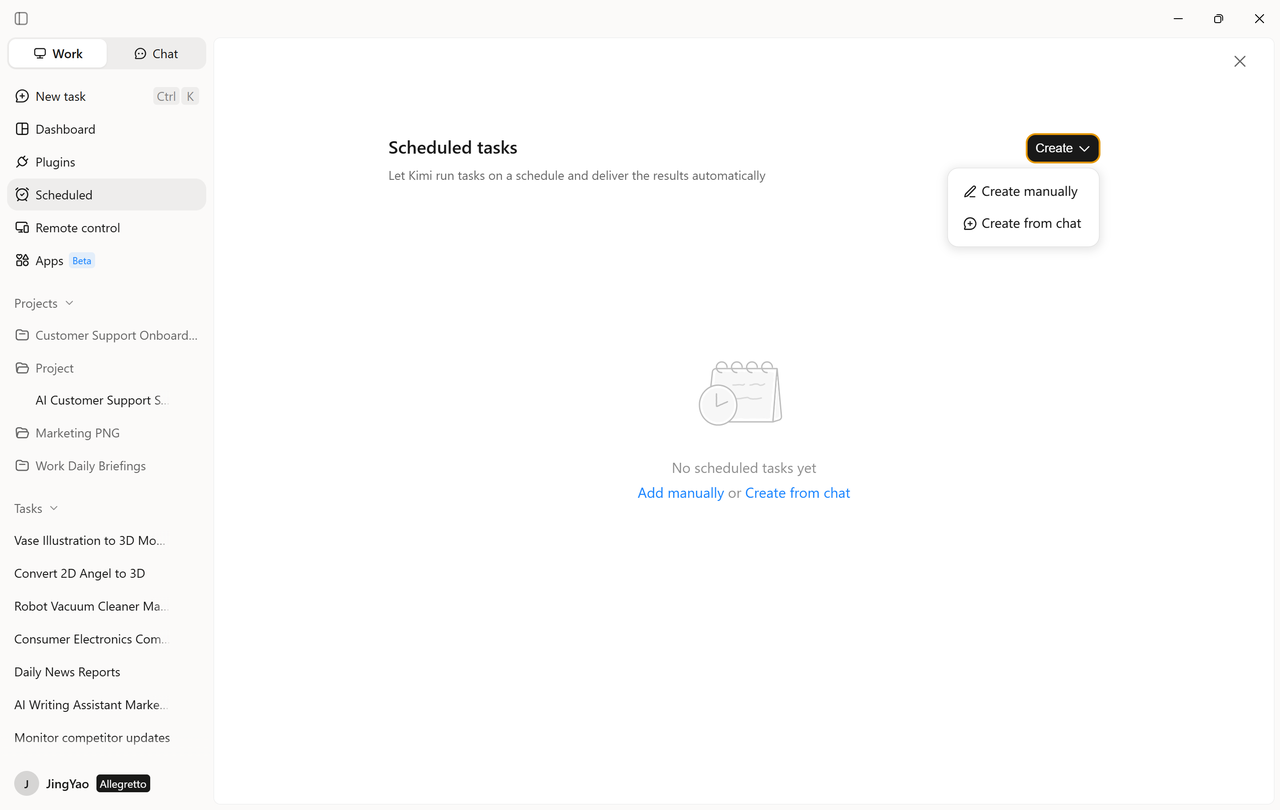
Open Kimi Work and navigate to "Scheduled Tasks," then select "Create a task." Choose "Add manually" to configure the task directly or "Create from chat" to describe the recurring analysis in natural language. For example, a startup founder could schedule a weekly review of revenue, new customer acquisition, marketing spending, and progress toward monthly targets.
Step 2: Configure the review instructions and schedule
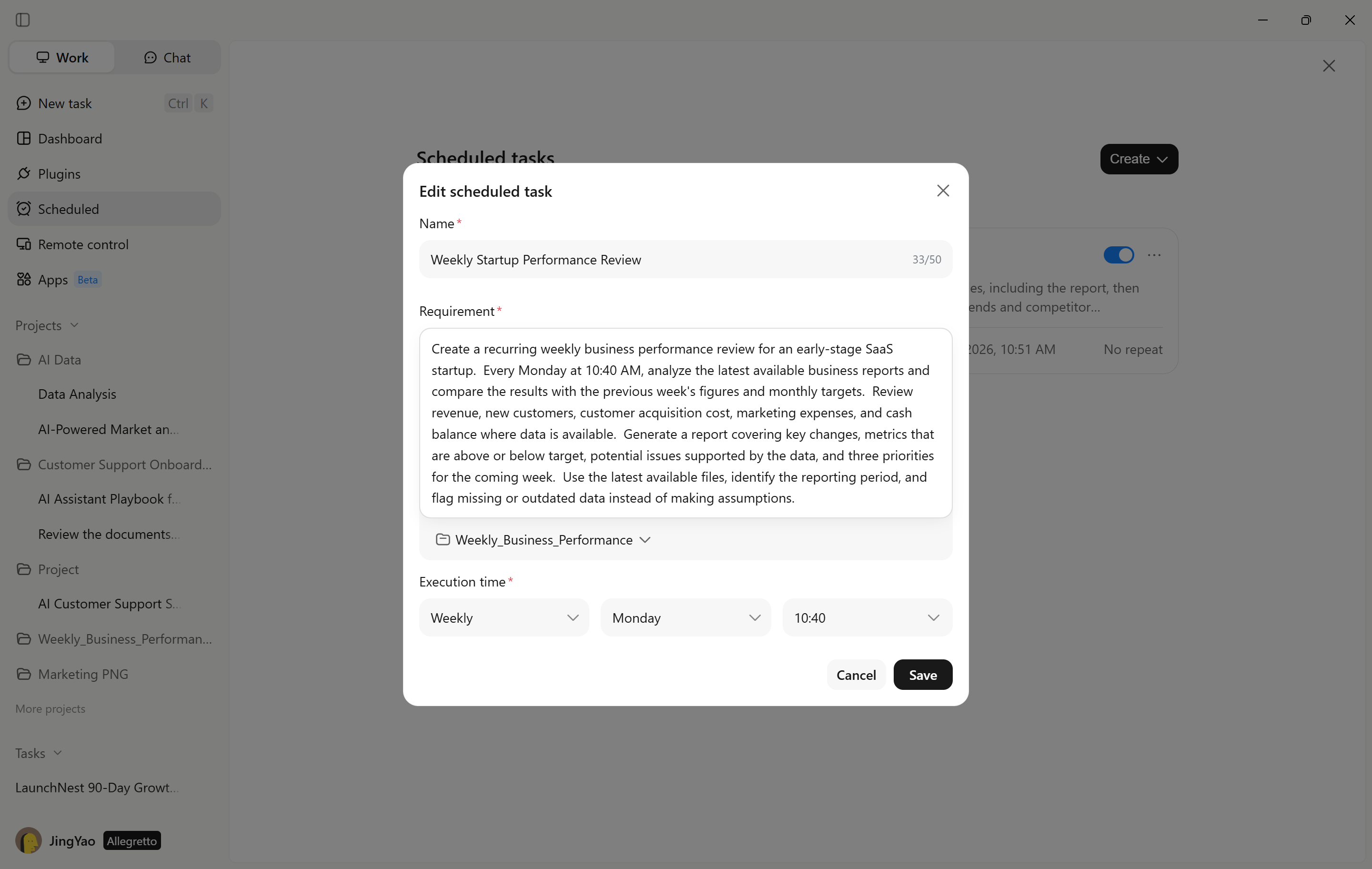
Specify which business files the task should use, which metrics to review, and how the results should be presented. Set the recurring schedule to match the startup's reporting cycle, such as every Monday morning.
Review the instructions and schedule, then click "Save" to enable the task. Clear reporting requirements help keep weekly reviews consistent, making it easier to spot changes in business performance.
Step 3: Review the startup performance report
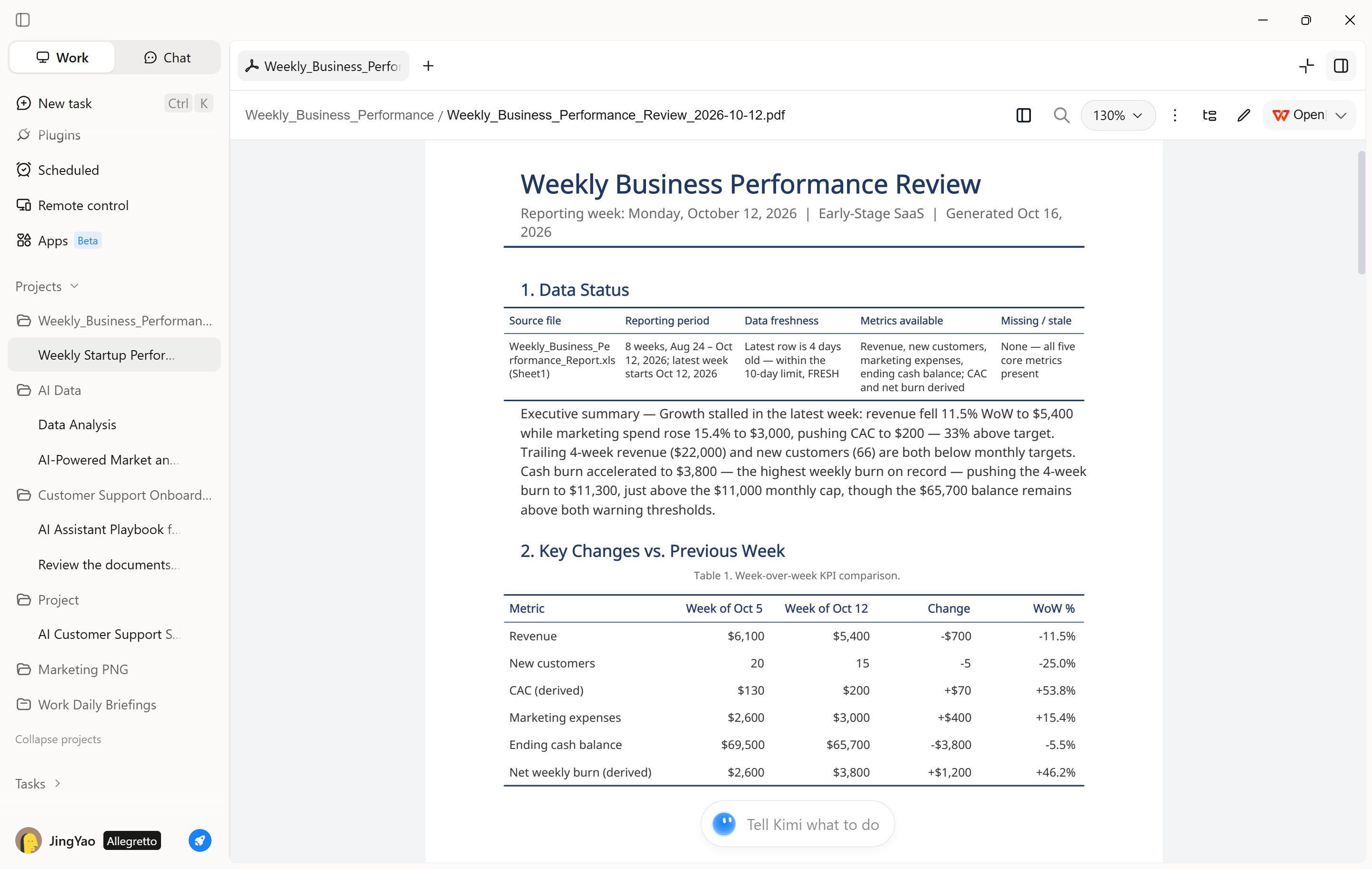
After the task runs, open "Projects" to check its status and review the generated report. Examine changes in revenue, customer acquisition, spending, and progress toward business targets.
If the report misses important metrics or provides insufficient explanations, refine the task instructions or update the source files.
Method 2: Analyze startup business data with plugins
Kimi Work's data analysis workflow can help founders process spreadsheets, calculate business metrics, identify performance trends, and organize findings for planning.
Step 1: Select a data analysis plugin
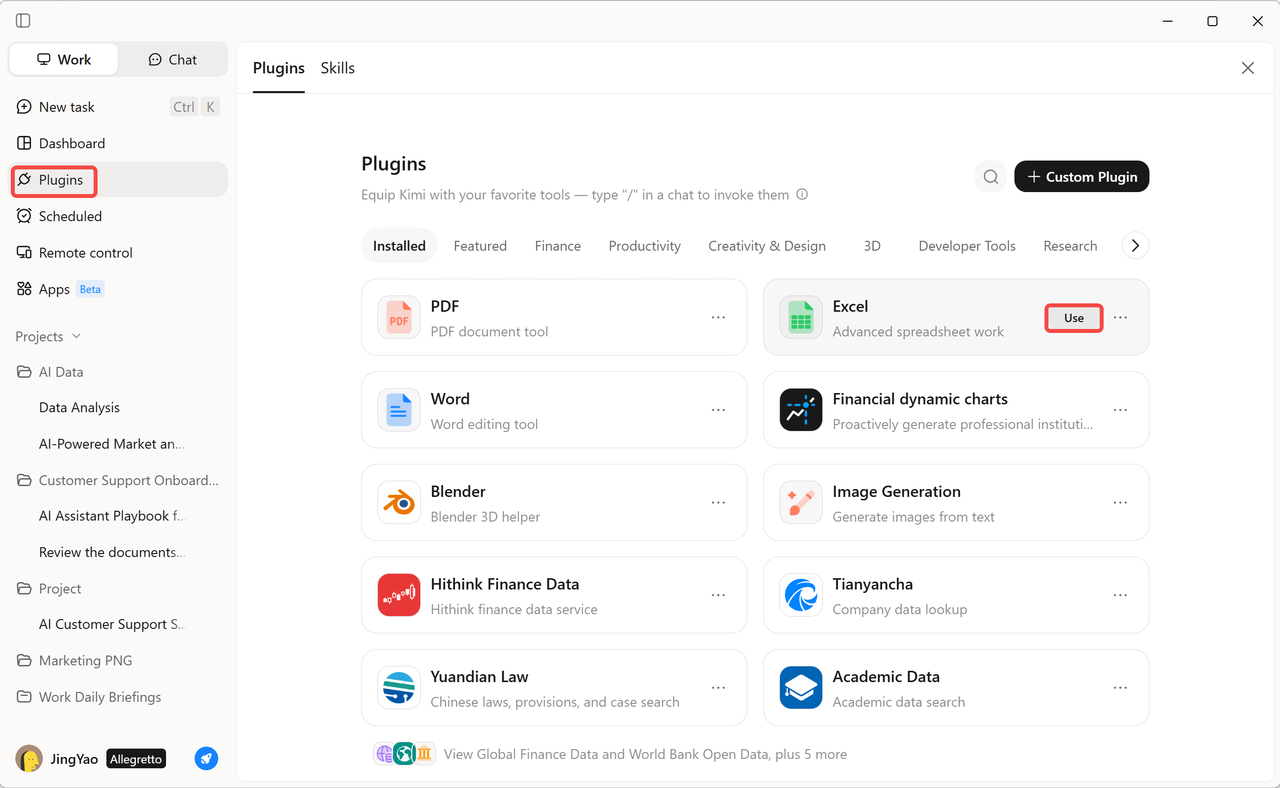
Open the "Plugins" section in Kimi Work and explore the available tools. Choose "Excel" for spreadsheet analysis.
Step 2: Provide the startup data and analysis requirements
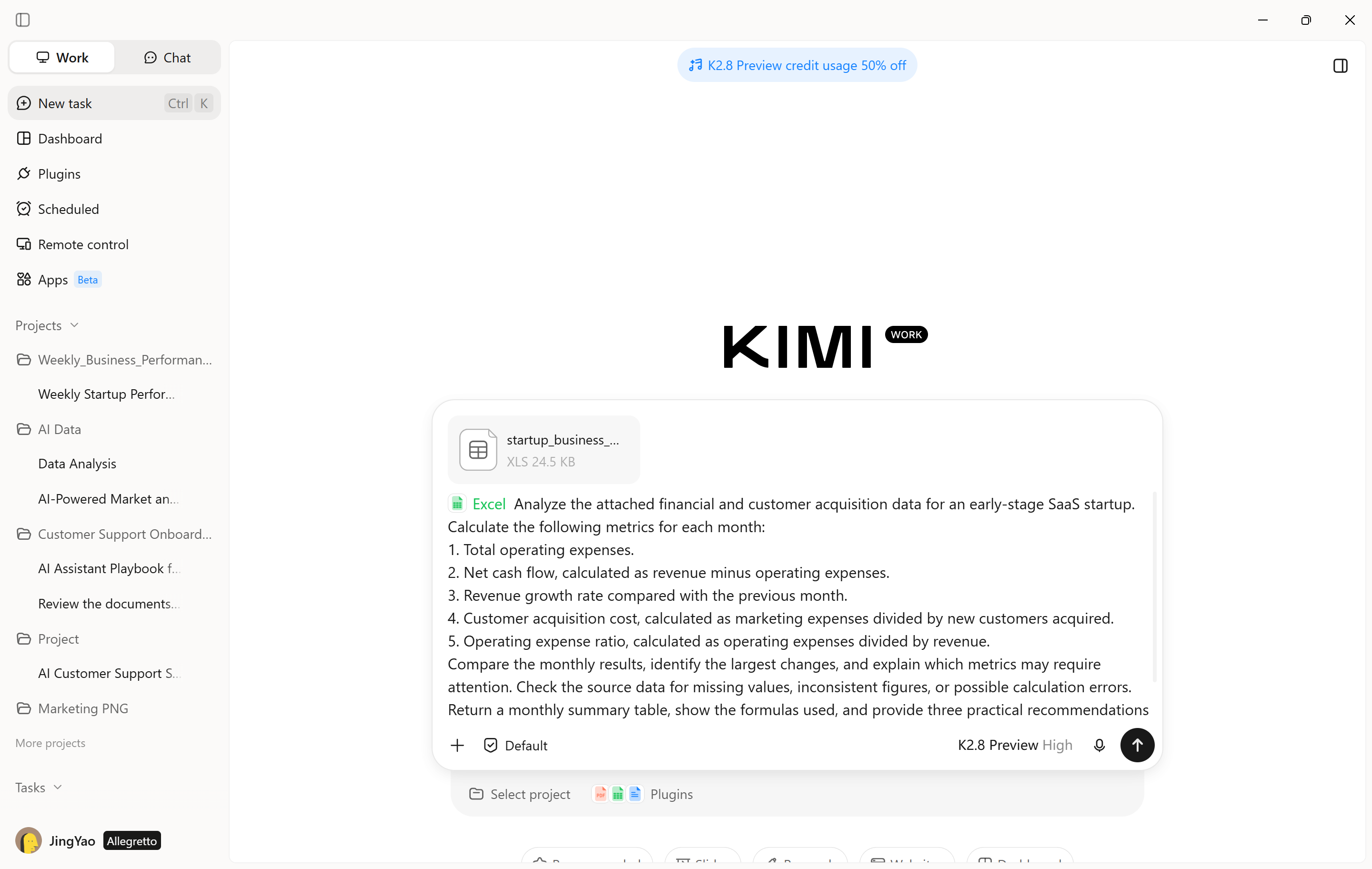
Upload a spreadsheet containing business performance figures and describe the calculations or comparisons you need. Specify the metrics, reporting period, and questions the analysis should answer.
Example prompt:
Step 3: Review the calculations and refine the analysis
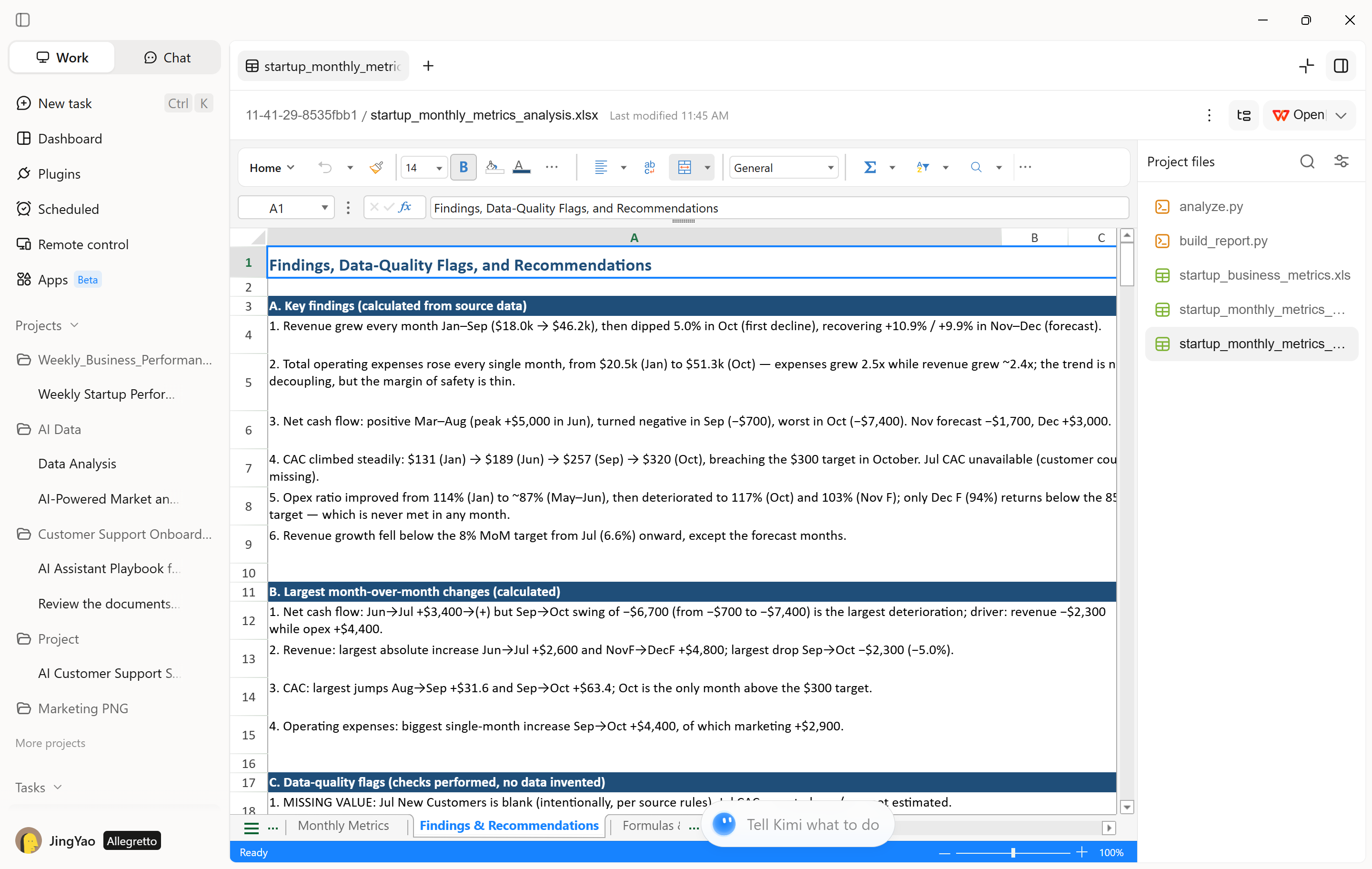
Check the generated calculations and compare them with the original spreadsheet. Ask follow-up questions to investigate unusual changes, compare individual expense categories, or test how different spending levels could affect cash flow.
Method 3: Create a startup performance dashboard
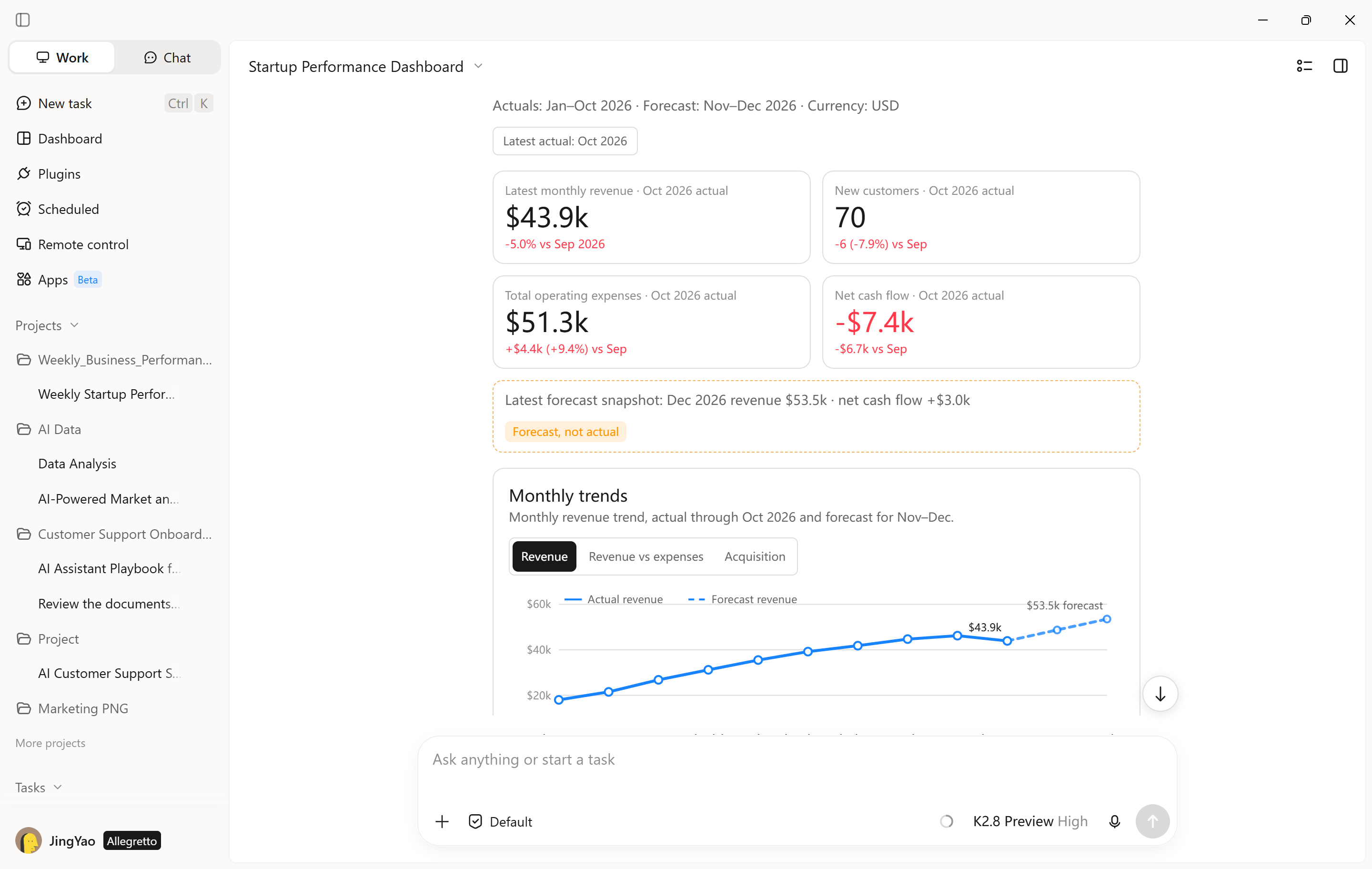
Kimi Work can help organize startup metrics into charts, summary tables, and KPI cards, making it easier to track growth and identify areas that need attention.
Step 1: Define the dashboard metrics and requirements
Prepare the relevant business data and specify the metrics you want to monitor.
Example prompt:
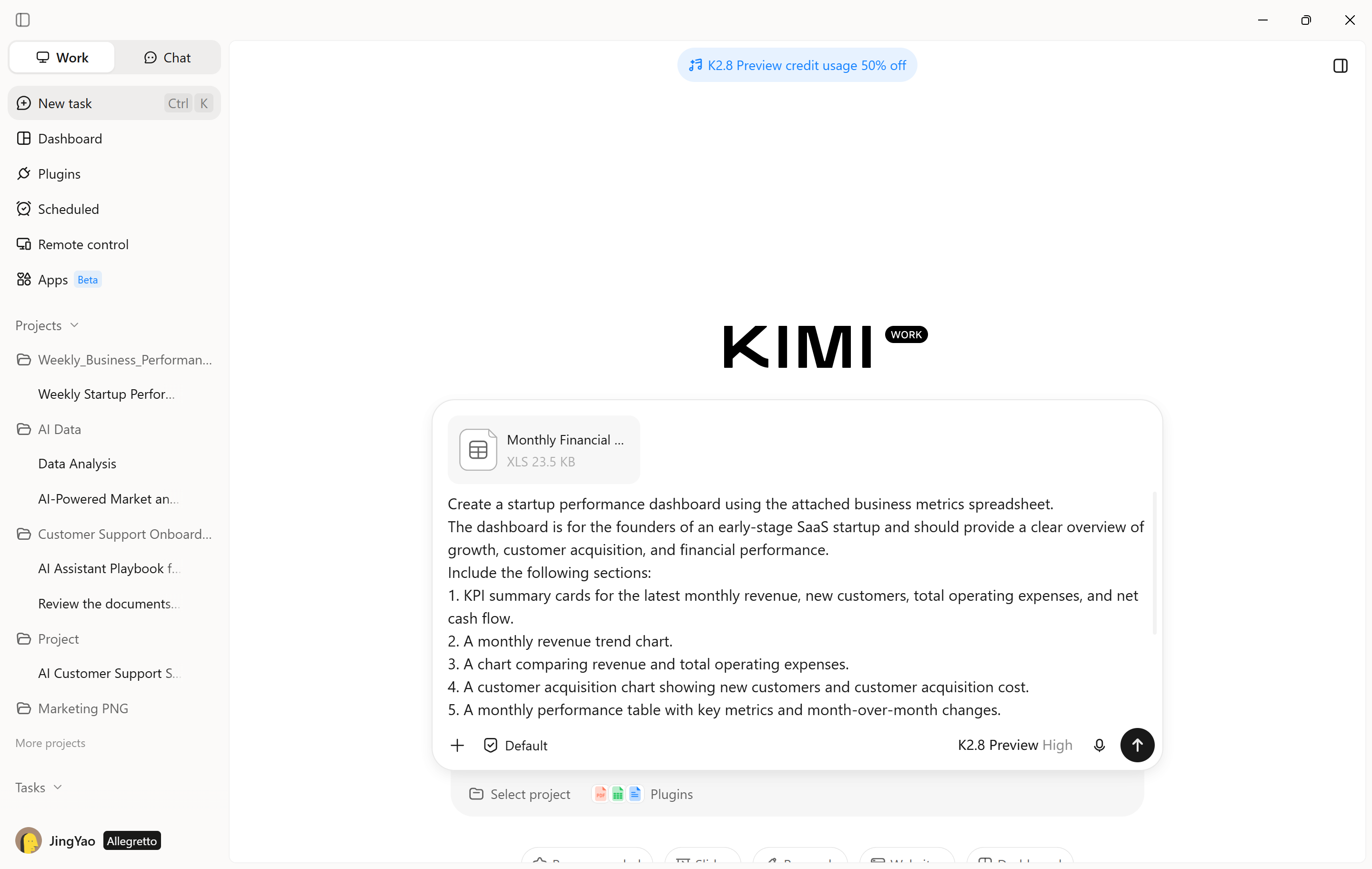
Step 2: Generate and review the dashboard
Review the dashboard to confirm that the figures match the source spreadsheet and that the visualizations make important trends easy to understand. Refine the dashboard by adjusting the metrics, chart types, reporting periods, or layout. For example, you might add a breakdown of marketing expenses or emphasize cash flow if the startup is preparing for a funding round.
How to adopt AI successfully in startups
Adopting AI requires more than choosing a tool and adding it to daily operations. Startups need to identify the right tasks, prepare reliable inputs, and evaluate whether AI delivers measurable benefits. The following steps can help businesses introduce AI for startups effectively and build workflows that support long-term growth.
Identify a specific business problem: Define a clear goal instead of adopting AI simply to improve productivity. Common examples include collecting competitor information, preparing monthly reports, drafting customer communications, and reviewing large volumes of documents.
Choose an appropriate AI solution: Different business tasks require different AI tools. A general-purpose assistant may be sufficient for research and writing, while specialized applications can support customer service, financial analysis, or workflow automation. Before choosing a solution, consider its features, cost, integration options, security, and ease of use.
Prepare reliable inputs and clear instructions: AI tools generally produce more useful results when they receive relevant information and specific instructions. Provide the necessary documents, explain the business objective, identify the intended audience, and specify the required output format. For example, a market research prompt might require competitor names, source links, pricing comparisons, key findings, and unresolved questions. This helps the AI produce organized results that are easier to review and use.
Test the workflow and review the output: Before using AI for startups, test it on a small set of representative tasks. Compare the results with your existing process to evaluate accuracy, consistency, completion time, and the amount of manual correction required. For sensitive or high-risk applications, conduct additional security checks and establish appropriate human review before implementation.
Measure results and expand gradually: Track measurable indicators such as time saved, error rates, cost per task, customer response times, and prototype development speed. Once a workflow consistently meets expectations, expand it to similar tasks or connect it with other business systems. This gradual approach helps startups develop an effective AI strategy based on actual results rather than assumptions.
Conclusion
Startups can use AI to simplify daily operations, improve decision-making, and make better use of limited resources. From market research and product development to marketing and customer support, AI for startups offers practical ways to build smarter workflows and support business growth. With a clear strategy and proper human oversight, startups can turn AI tools such as Kimi Work into a valuable part of their long-term growth.